

AirPods Case Leather: Fit, Types and Care
Your commute pocket already holds keys, a cardholder and a glossy white AirPods charging case. You're looking for something that stops the plastic rubbing against everything else, but the handsome leather cover you've found has a thick flap and a metal snap directly across its back. Before choosing the colour, check whether you'll still be able to open the lid and use your usual charger.
Table of Contents
- What a Leather AirPods Case Is For
- Sleeves Zipper Pouches and Snap Cases
- Fit and Charging by AirPods Model
- Protection Leather Can and Cannot Give
- Full Grain Crazy Horse and Smooth Finishes
- How to Clean and Dry a Leather Cover
- Choose a Case You Will Keep Using
What a Leather AirPods Case Is For
A leather AirPods case is a cover or small pouch for the charging case, not somewhere to drop loose earbuds. The charging case still holds, charges and protects the earbuds. The leather takes the wear from the outside world.
In that shared commute pocket, leather has several useful jobs. It takes the rubbing that would otherwise mark the plastic, gives your fingers a less slippery surface, and develops a finish shaped by handling. A cover with a little texture can also be easier to retrieve from a bag than bare, smooth plastic.
Those benefits don't turn it into a waterproof enclosure for batteries and electronics. Choose leather for comfortable handling and everyday surface protection, not as equipment for wet conditions.
Buying order: Choose the format, establish the fit, check charging, then choose the leather and personalisation.
Start with how you carry the case. A sleeve suits frequent pocket access, a zipper pouch separates it from loose objects, and a snap case offers a more structured enclosure. The format comparison below is more useful at this stage than a discussion of leather grades.
Next, identify the exact AirPods generation and charging-case version. For AirPods is an incomplete compatibility claim. A cover should name the charging case it accepts, rather than rely on a photograph of a similar white box.
Only after those decisions should colour, grain and a monogram matter. An attractive cover that you remove every time you need an earbud or charge the battery will probably end up in a drawer.
Sleeves Zipper Pouches and Snap Cases
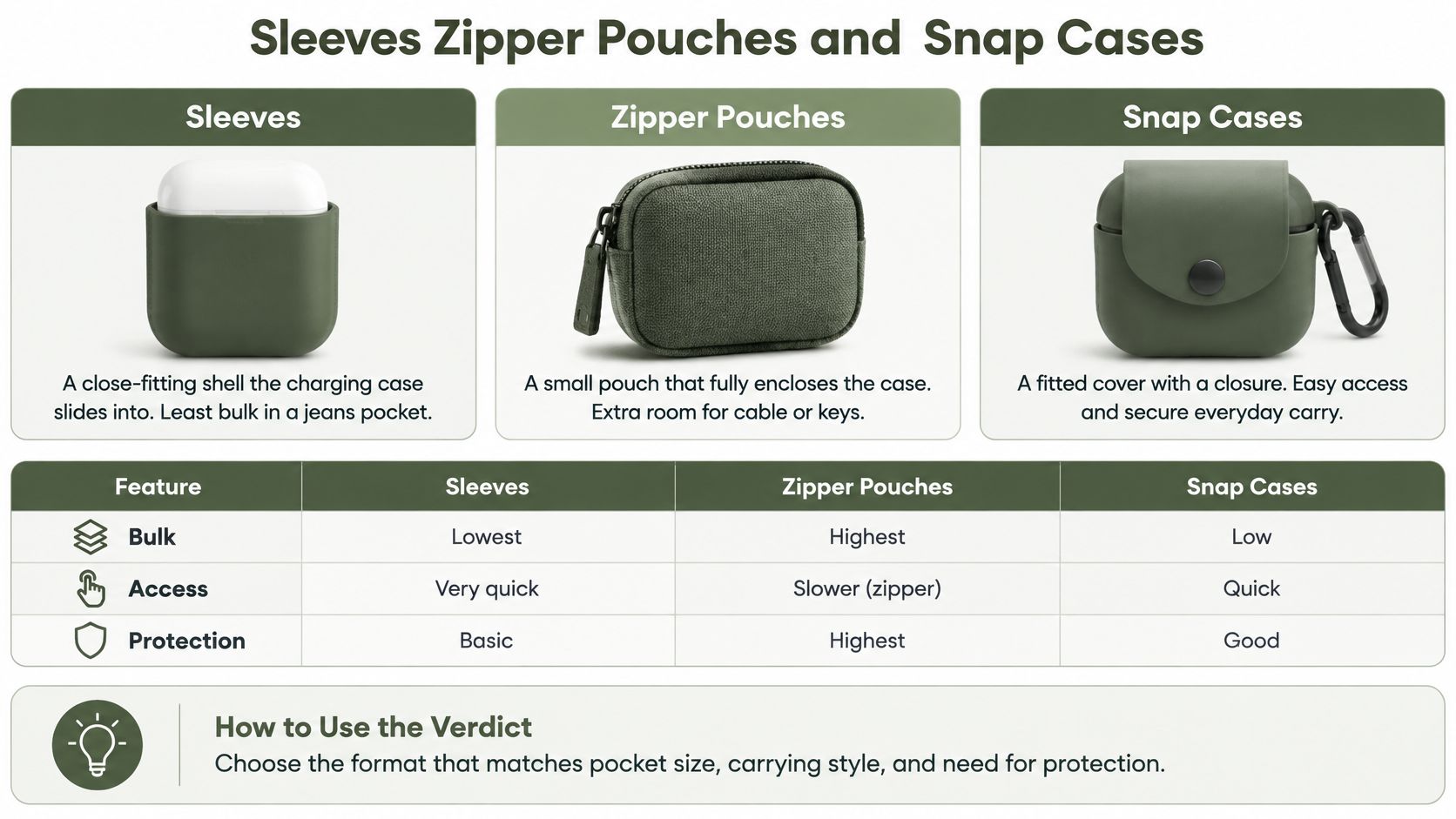
A sleeve or slip cover is a close-fitting shell that the charging case slides into. A zipper pouch is a separate enclosure, rather like a miniature accessory bag. A snap or flap case surrounds the charging case with a closure that folds over it.
These formats solve different carrying problems. Don't judge them by how substantial they look on a desk. Judge them with your pocket, bag and access habits in mind.
Leather AirPods Case Formats Compared
| Format | Best carry | Access while worn | Protection level | Charging note |
|---|---|---|---|---|
| Sleeve or slip cover | Jeans or jacket pocket | Lid must clear the sleeve mouth | Light scratch and pocket-rub protection | Port may stay open; wireless charging needs testing through the walls |
| Zipper pouch | Backpack or travel kit beside keys | Case comes fully out to use | Best separation from keys and grit when closed | Remove the case to charge |
| Snap or flap case | Desk or structured bag | Flap opens; charging case stays inside | Moderate scuff protection and cushioning against light knocks | Hinge and port cutouts must align; keep metal snaps away from the charging interface |
Choose for the Moment You Reach for It
A sleeve is the least cumbersome option when you regularly reach for an earbud while walking or commuting. Its opening needs to sit below the lid's moving edge. If you have to peel the leather down with a thumbnail, the pattern isn't giving you convenient access.
Check the sleeve's retention, too. It should hold the charging case without requiring a hard squeeze to insert it. A loose sleeve with a generous mouth may be easy to use but offers little reassurance when you pull it out of a crowded pocket.
A zipper pouch works better when the AirPods travel beside keys, adapters and coins. A smooth lining separates the charging case from the enclosure's hardware. The zipper should open far enough that you can lift the case out without dragging it across the teeth.
Keep keys outside that lined compartment, even if the pouch has room for them. A shared enclosure merely moves the original pocket problem inside the leather.
A snap case suits someone who wants a defined place for the AirPods in a briefcase or on a desk. Its closure should fasten without pressing down on the charging-case lid. Test it with the flap folded back, because a stiff flap can make an otherwise roomy cover awkward to use.
The same enclosure choices appear in leather sunglass cases: easy access, a protective closure and crush resistance aren't interchangeable features.
The practical verdict is simple: sleeve for all-day pocket carry, zipper pouch for travel beside hard objects, snap case for a desk or structured bag. Don't accept extra bulk unless it solves a problem you have.
Fit and Charging by AirPods Model
Match the charging case, not just the earbuds' name. Apple's Wireless Charging Case specifications list the case for AirPods second generation and earlier at 44.3 × 21.3 × 53.5 mm.
Apple's AirPods comparison page lists AirPods third-generation case dimensions of 54.4 × 46.4 × 21.38 mm and distinguishes charging features across models. Check the current listing for your exact version before treating a seller's compatibility label as sufficient.
AirPods Charging-Case Fit and Openings
| Model | Charging-case size | Chargers to verify | Openings to keep clear |
|---|---|---|---|
| AirPods second generation and earlier wireless case | Use the Apple dimensions cited above | Lightning and supported wireless charging | Port, status light, rear pairing button, hinge |
| AirPods third generation | Use the Apple dimensions cited above | Lightning; check the specific case's wireless support | Port, status light, rear pairing button, hinge |
| AirPods fourth generation | Check the exact case version's published dimensions | USB-C; verify wireless support for that version | Port, pairing-control area, status light, any speaker openings |
| AirPods fifth-generation listing | Verify the model and dimensions against Apple before buying | Confirm the actual port and supported chargers | Check every control, opening and moving edge on the actual case |
| AirPods Pro generations | Use the dimensions for the exact Pro generation | Lightning or USB-C; verify Qi, MagSafe and Apple Watch charging individually | Port, status light, pairing control, any speaker holes and lanyard attachment |
A retailer's fifth-generation label alone isn't enough to establish compatibility. Don't infer a fit from an apparently similar shape or accept dimensions copied from another model.
Snug Is Not the Same as Tight
Leather thickness, lining, adhesive and turned edges all occupy space. A maker needs to allow for them in the finished internal cavity, rather than cut an outline that matches the charging case's exterior measurements.
Too much slack lets the case move inside the cover. Too little clearance can push against the lid or prevent it opening naturally. Don't buy a binding cover on the assumption that stretching will fix it.
Look at the rear with the lid fully open. The leather shouldn't bunch into the hinge, and stitches shouldn't be pulled taut across its moving gap. A separate lid cap must stay attached without dragging the base upward.
Test the Charger You Already Own
Cable access means more than seeing the socket. The opening must admit the connector's moulded housing without forcing the cable sideways. Check with your normal cable, not an unusually slender display cable.
Qi charging and magnetic attachment are different checks. A charging case's MagSafe support doesn't automatically make its leather cover compatible with every magnetic charger. Added material or misplaced hardware can prevent the case sitting where it needs to sit.
- Use your normal charger: Check that charging starts through the leather and remains stable when you release the case.
- Check your holding angle: The status light should be visible without peeling back an edge.
- Reach the controls: Where there's a physical pairing button, its opening should let your thumb press it comfortably.
- Inspect optional features: Speaker openings and lanyard attachments need clearance only where your actual case has them.
A cover passes when it preserves your routine, not merely when the charging case fits inside.
Protection Leather Can and Cannot Give
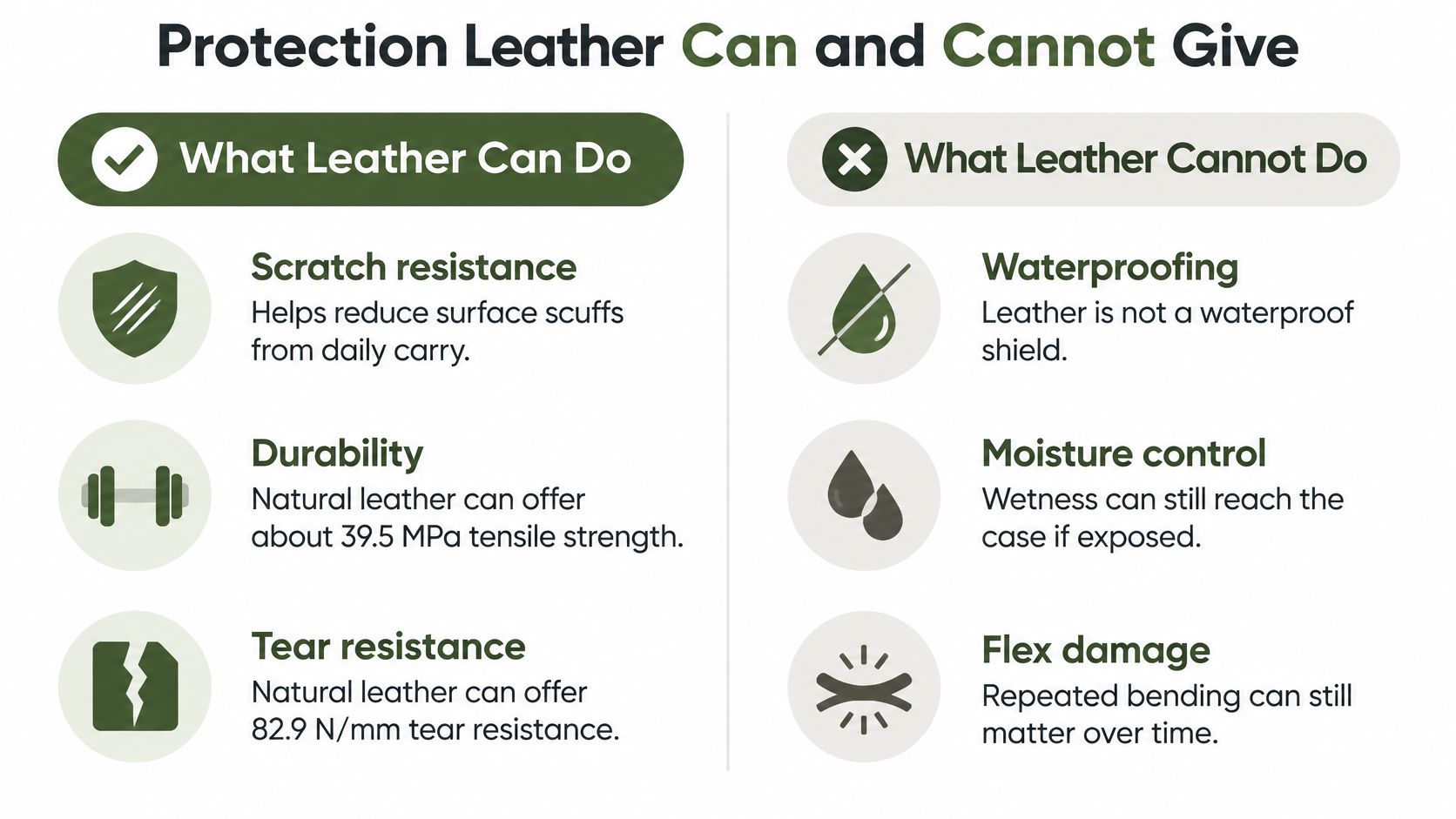
Natural leather combines flexibility with useful resistance to tearing and surface wear. A comparative materials study published in Coatings recorded approximately 39.5 MPa tensile strength and 82.9 N/mm tear resistance for natural leather under its reported test conditions.
Those are material measurements, not a drop rating for a finished AirPods cover. They help explain why leather is useful for repeated pocket insertion, rubbing against bag interiors and bending around an opening. They don't establish how a particular snap case will behave if you drop it on a pavement.
Construction Matters More Than Apparent Heft
Inspect the places where the leather narrows around a cutout. A generous rounded corner leaves a more forgiving transition than a sharp notch. Reinforcement matters at a strap attachment or snap, where the force concentrates in a small area.
Stitching should follow a consistent path without running so close to the edge that little leather remains outside the holes. At the hinge, the pattern should let the material bend rather than force a hard crease through a seam.
A thick cover can still be poorly made. Excess leather around the lid may make opening harder without improving protection where the case is most exposed. For longer-term material expectations, the discussion of full-grain leather lifespan helps separate leather quality from construction and care.
Leather is a jacket, not a dry bag.
Draw the Boundary at Crushing and Water
Leather is a sensible choice for commuting, office use and ordinary travel. It isn't a rigid structure that can reliably resist someone sitting on the case, nor is it a sealed barrier against a soaked jacket or sweat inside a gym bag.
Breathable material also isn't a promise that moisture will escape quickly from a tightly fitted enclosure. Don't treat a cover's dry-looking exterior as evidence that its lining is dry.
Keep accessory protection separate from the merits of the headphones themselves. NeoTeo's discussion of the reasoning behind TechRadar's 2026 pick concerns an over-ear headphone choice, not a protective-case test or an AirPods charging-case fit guide. An equipment recommendation can help you assess the device, but it can't validate the leather surrounding another product.
Choose the cover for surface wear and handling, and use a different carrying arrangement when exposure or crushing is the main risk.
Full Grain Crazy Horse and Smooth Finishes
Think about a wallet you already own. Its feel comes partly from the hide, but also from the tanning, oils, waxes and surface finish. AirPods case leather behaves the same way, with the added complication of a small lid that concentrates bending into a narrow area.
Full-grain, Crazy Horse, vegetable-tanned and Nappa aren't mutually exclusive quality grades. They describe different aspects of the material. A full-grain hide can also be waxed or vegetable-tanned, while a soft leather's name alone doesn't establish its durability.
Leather Finishes Compared at the Hinge
| Finish | Day-one look | Marks at the hinge | Best case type |
|---|---|---|---|
| Full-grain natural | Visible grain and natural tonal differences | Develops creases and handling marks | Sleeve for daily pocket carry |
| Crazy Horse or waxed full-grain | Rich tone with a pull-up effect | Lighter streaks can appear where it bends | Sleeve or pouch where visible patina is wanted |
| Smooth corrected | Even colour and a more uniform surface | A coating can crack if forced into a tight fold | Snap case with a well-supported shape |
| Vegetable-tanned | Often firm, with colour determined by its finish | Can deepen in tone with handling and exposure | Structured snap case |
| Nappa or soft tannage | Supple, smooth and dressy | Soft surfaces can show rubbing from hard objects | Sleeve carried separately from keys |
Choose the Marks You Can Live With
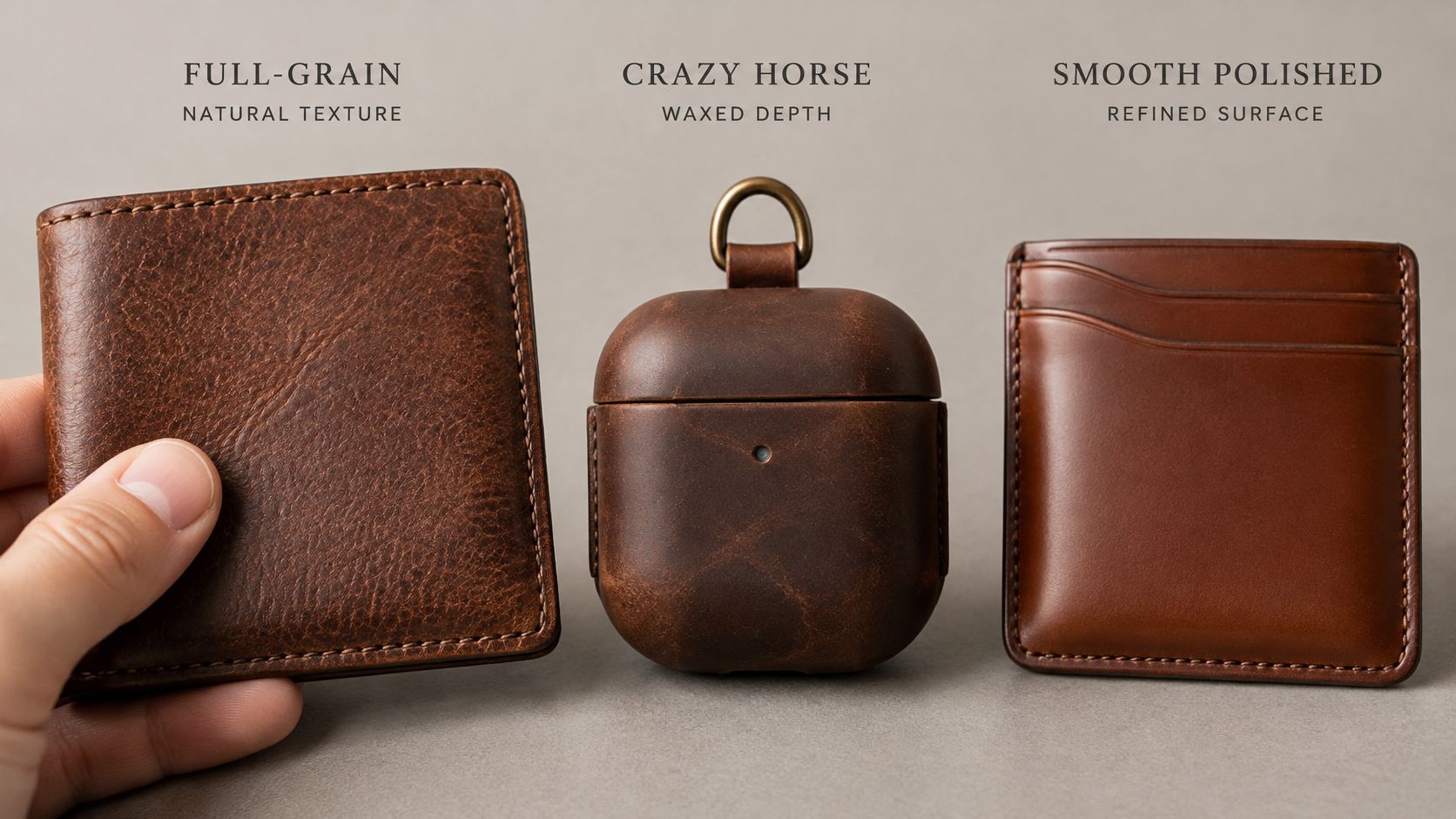
Full-grain leather retains the hide's outer grain surface. It's a sensible starting point, but the label doesn't excuse poor stitching or a clumsy pattern. Natural marks should look intentional within the finished piece, not be hidden beneath vague claims of character.
Crazy Horse leather is commonly associated with a waxed pull-up appearance. Bending and rubbing redistribute the finish visually, so the lid edge may look lighter than the body. If that appeals to you, what Crazy Horse leather is explains the finish more usefully than colour photographs alone.
Smooth corrected leather offers a more even appearance. Check how its coating behaves around the opening, rather than assuming a uniform surface is either better or worse. A hard fold is demanding on any surface treatment.
For a soft sleeve, avoid a bulky seam that defeats the supple material. For a structured vegetable-tanned case, check that the flap bends at its intended hinge without requiring pressure on the plastic lid.
- Inspect the edges: Burnishing or edge paint should be even, without rough fibres or a thick ridge.
- Examine the lining: It should lie flat, with no hard glue spots against the charging case.
- Choose colour deliberately: Pale finishes make transferred dye and grime more conspicuous.
Buy the finish whose everyday marks you'll accept, not the one that looks most immaculate in a showroom image.
How to Clean and Dry a Leather Cover
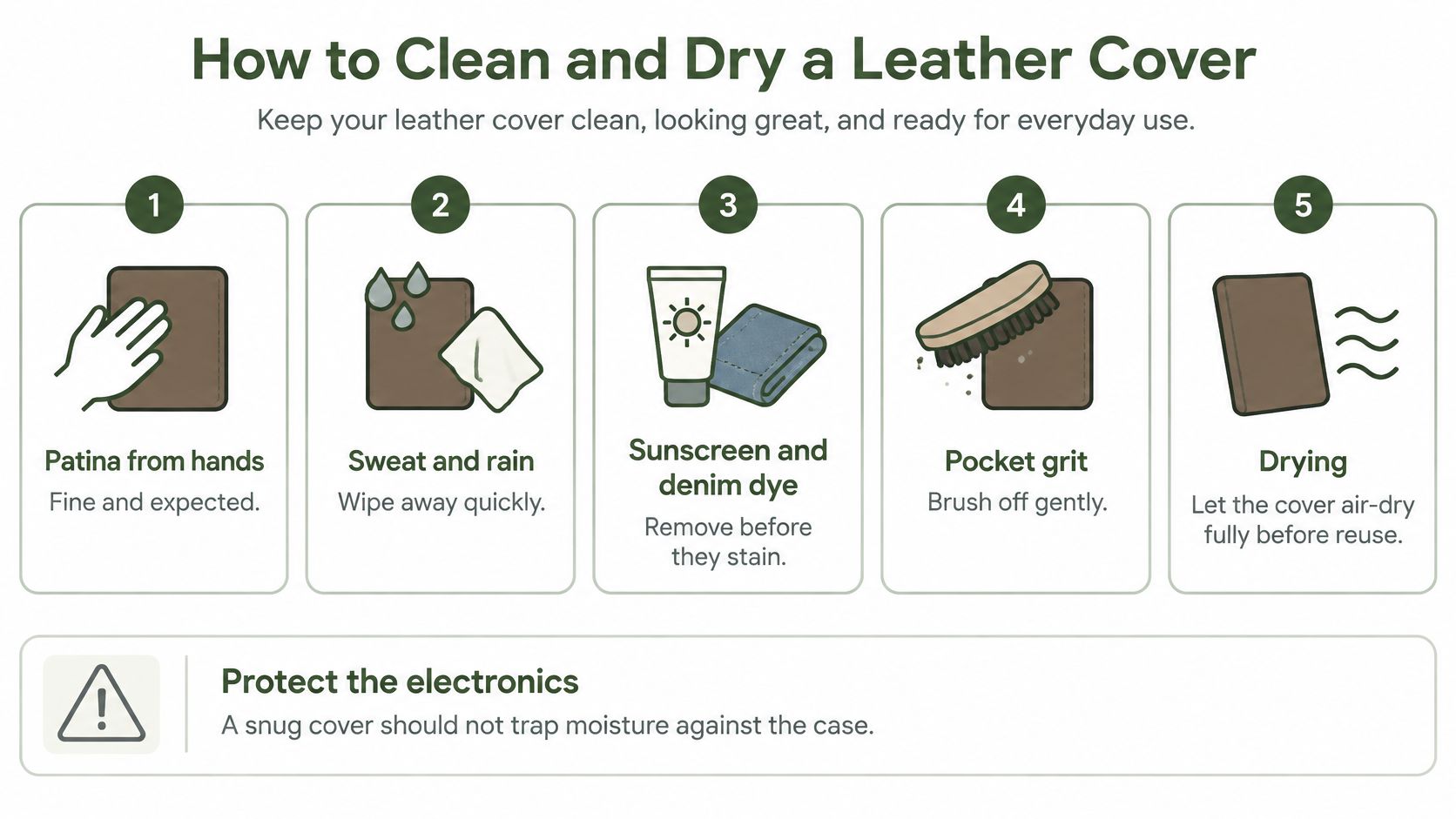
Patina from ordinary handling is one thing. Sweat, sunscreen, rainwater and pocket grit are contaminants, not finishing treatments. A snug cover can conceal them against the charging case.
Apple's AirPods safety information warns that batteries and sensitive electronics can be damaged by liquids, excessive heat, crushing and industrial chemicals. Keep leather cleaning separate from cleaning the electronic case.
An Ordinary Cleaning Routine
- Remove the charging case. Never clean the leather with the electronics still inside. Set the charging case somewhere dry, away from the cleaning cloth and any care product.
- Brush out loose debris. Use a soft, clean brush around the seams and flap fold. Tap a pouch gently over a clean surface so loose grit falls out instead of being rubbed into the lining.
- Wipe with minimal moisture. Use a soft cloth that's barely damp, not wet enough to release droplets when squeezed. Avoid household sprays, solvent cleaners and vigorous scrubbing.
- Air-dry the cover fully. Open the flap or pouch and leave it at room temperature with air around it. Don't use a radiator, hot dashboard or hair dryer to hurry the process.
- Inspect before refitting. Look for lint around the charging-case port and any speaker mesh. Don't push debris inward with a pin or drip cleaner into an opening.
- Give the lining time uncovered. Periodically leave the charging case out of the leather overnight, particularly after humid travel. Refitting should wait until both the surface and lining feel dry.
Condition Lightly and Treat Stains Carefully
Dry full-grain leather may benefit from a small amount of compatible conditioner. Apply it to a cloth first, test a concealed area, and let the finish settle before putting the charging case back. Heavy oils can leave the surface tacky and attract pocket debris.
Sunscreen and denim transfer need more caution than ordinary dust. Rubbing harder can spread a mark or alter the finish; use the stain-specific approach in how to get stains out of leather rather than reaching for a stronger household cleaner.
After rain: Attend to the electronic case first, leave charging until it's dry in accordance with its instructions, and dry the leather separately.
This routine maintains an exterior accessory. It doesn't add water resistance to the AirPods or make a damp cover safe to reuse immediately.
Choose a Case You Will Keep Using
Before choosing colour, run through the checks that determine whether the cover belongs in your daily carry.
- Identify the exact case. Match the generation and charging-case version to the seller's compatibility statement. Reject a listing that leaves the supported model ambiguous.
- Confirm your charging routine. Name the cable connection and any wireless charger you use.
- Check access in the chosen format. Make sure the sleeve mouth, flap or pouch opening lets you use the lid, light and controls comfortably.
- Try the complete arrangement. Put the covered case on your usual charger and check it in your normal pocket or bag.
Then consider the material description. A guide to grades of leather can help interpret labels, but construction still deserves a close look.
Keep personalisation on the front face, clear of folds and cutouts. Debossed initials are understated; foil needs a suitable surface rather than an oily, heavily waxed finish. Coordinate colour only after function works, whether you're matching a wallet or comparing Apple Watch straps from Nothing But Bands.
Our AirPods Pro & 3 Case is sold for €21,56. Check the exact charging-case compatibility before choosing it, especially when buying as a gift.
Grainmark Leather offers full-grain leather bags, small leather goods and a Cases Collection that includes AirPods cases alongside storage for pens, watches and eyewear. Visit Grainmark Leather to compare an AirPods cover with your charging case and carry style, then choose the finish you'll enjoy using.