Laptop Document Holder Guide for Working Professionals
You're probably already doing the awkward version of this.
A printed contract sits to the left of your laptop. Your notebook is half under your charger. You keep glancing down, then back up, then back down again. By midday, your neck feels tight and your desk looks like a temporary staging area instead of a place to work.
That's the use case for a laptop document holder. It isn't a niche office extra for people with unusually tidy desks. For many professionals, it's a practical way to make paper and screen work together, especially when the same person shifts between home, office, shared desks, trains, and client meetings.
Table of Contents
- Why the Laptop Document Holder Matters at Work
- What a Laptop Document Holder Actually Does
- Folio, Sleeve, and Portfolio Formats Compared
- Why Full-Grain Leather Changes the Experience
- Sizing, Angle, and Posture Fundamentals
- Organization Features That Earn Their Space
- A Day in the Life of a Hybrid Professional
- Buying and Caring for the Right Holder
Why the Laptop Document Holder Matters at Work
The problem usually starts small. You print a brief for one meeting. You carry one legal pad because you think better on paper. Then your week fills with marked-up decks, meeting notes, receipts, signed forms, and a laptop that has to coexist with all of it.
A laptop document holder helps because it solves two issues at once. It improves where you place reading material, and it gives those loose materials a defined home while you work.
It supports the way people actually read at a laptop
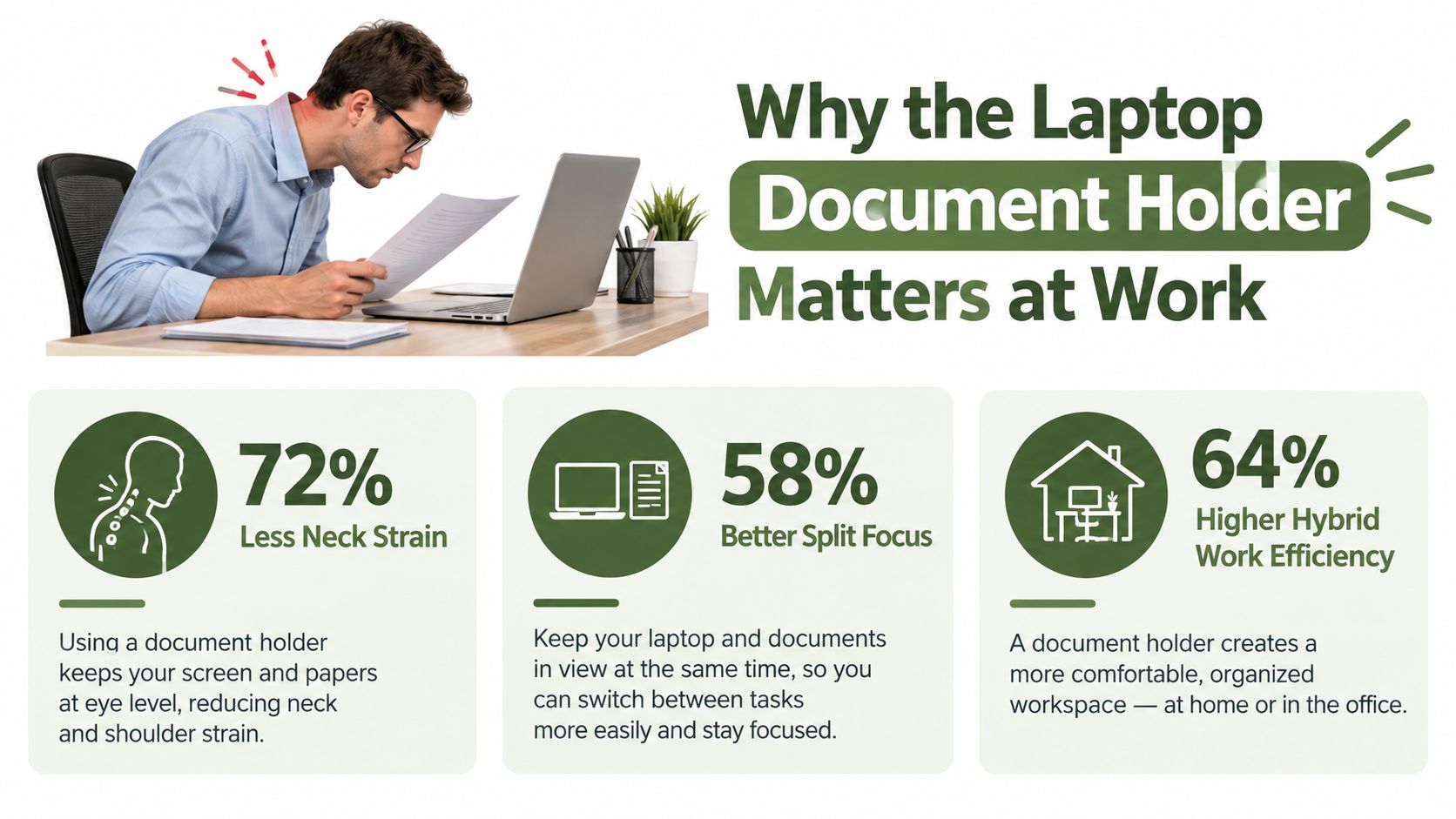
Ergonomic guidance is fairly clear on the basic idea. A document holder should place paper at the same height and roughly the same viewing distance as the laptop screen, because that helps keep the neck in a more neutral posture and reduces repeated head flexion. The same guidance notes that an easel-style stand works well with laptops, and that a raised laptop stand makes screen and document heights easier to align, as explained by Desk Setup Lab's ergonomic document holder guidance.
That sounds technical, but the lived experience is simple. If the page sits flat on the desk, you keep dropping your head to read it. If the page sits close to your screen line, your eyes do more of the work and your neck does less.
Practical rule: If you reference the same page more than a few times in a task, it shouldn't live flat on the desk.
It also reduces bag-to-desk friction
Hybrid work changed what many people carry. It's not just a laptop anymore. It's papers, cards, chargers, pens, and the odds and ends you need to move through a workday without rebuilding your setup each time.
That's why a laptop document holder belongs in the same conversation as the rest of your daily carry. If you're also rethinking how your work essentials travel together, it's worth looking at options that browse luxury work handbags for compact professional carry, especially if your setup needs to move cleanly from commute to meeting room. For a more traditional carrying format, these examples of leather laptop briefcases show how structured bags handle papers, devices, and accessories differently from soft totes.
There's also a broader market signal behind this category. The global laptop stand with document holder market was valued at $0.4 billion in 2025 and is projected to reach $0.7 billion by 2034, with 5.8% CAGR from 2026 to 2034. The same market report says the adjustable segment held 42.3% of the market and office use accounted for 48.7% of revenue, according to Market Intelo's laptop stand with document holder market report.
What a Laptop Document Holder Actually Does
People often confuse this product with a sleeve, a folio, or a copy stand. That's understandable because a laptop document holder borrows something from all three.
The easiest way to picture it is this. It's a clipboard for digital work, but redesigned for the fact that you also carry a laptop. It gives papers a rigid or semi-rigid surface, organizes a few essentials, and in some versions helps position reference material where you can see it while using your screen.
Three jobs it should do well
First, it should improve document placement. Independent ergonomic guidance and a preliminary study both support in-line or near-screen placement. Positioning the holder between the keyboard and display can reduce lateral head rotation and downward gaze, and the study associated a document holder with the least neck-muscle activity during transcription and reference work. Practical setup advice commonly recommends a stable base and an angle around 30 to 60 degrees for readability and glare control, as summarized in Deskwellness Lab's review of ergonomic document holders.
Second, it should keep paper and small tools together. That means your printout doesn't migrate under your coffee cup, your business card doesn't vanish into a side pocket, and your pen isn't scraping against your laptop in a bag.
Third, it should add a layer of protection during travel. Not hard-shell protection, necessarily, but enough structure that papers don't crease badly and metal accessories don't rub directly against your device.
What it is not
A plain laptop sleeve protects a computer, but usually doesn't give you a useful working surface once you arrive.
A traditional folio holds paper well, but may not fit a laptop or protect it from everyday carry.
A classic padfolio sits somewhere adjacent to this category. If you want to compare that older format with newer device-friendly options, this overview of a personalized leather padfolio is a helpful reference point.
A good laptop document holder should make setup faster, not add one more object you have to manage.
That last point matters. If you need five steps to unfold it, reposition it, and load documents, it may be clever but not useful. The best ones disappear into your routine.
Folio, Sleeve, and Portfolio Formats Compared
The category gets clearer once you stop thinking about one product and start thinking about formats. The right choice depends less on style and more on where you work, how much paper you carry, and whether your holder mostly lives in your bag or on your desk.
Laptop document holder formats side by side
| Format | Best For | Document Capacity | Carry Style |
|---|---|---|---|
| Folio | Client-facing professionals who switch between notes and screen during meetings | Light to moderate. A few sheets, a notebook, cards, one pen | Carried by hand or slipped into a larger bag |
| Sleeve | Commuters who want laptop protection plus room for a few papers and accessories | Light. Best for slim stacks and flat items | Mostly carried inside a backpack or tote |
| Portfolio | Professionals handling thicker paperwork, meeting packets, or multiple categories of documents | Moderate to high. Better for larger stacks and more pockets | Hand-carried, briefcase-style, or used as a meeting organizer |
| Integrated stand | Remote and hybrid workers who need the holder to become part of the workstation | Usually light to moderate, depending on folding design | Travels flat, then opens into a working surface |
How each feels in practice
A folio is usually the least intimidating in a meeting. It opens like a book, lays reasonably flat, and lets you move between a signature page, a note page, and your laptop without looking over-equipped. That makes it a strong choice for consultants, account managers, and sales professionals.
A sleeve is more about transport than presentation. It works for designers, engineers, and anyone who carries printed references but doesn't want a separate organizer. If your laptop document holder spends most of its life inside another bag, sleeve-style formats are often enough.
A portfolio is better when your work still produces thick paper trails. Lawyers, executives, procurement teams, and operations staff often need more than a couple of sheets. They need categories, not just pockets.
An integrated stand makes the most sense when your desk changes often. Kitchen table in the morning. office touchdown space at noon. Hotel desk in the evening. These models do more setup work for you, but they can be fussier if the stand mechanism adds bulk.
For people who carry a small tablet alongside paper references, compact folio logic can overlap with device-specific organizers. A useful comparison point is this folio for iPad mini use, which shows how smaller-format organization changes what “enough storage” means.
Why Full-Grain Leather Changes the Experience
Material choice gets treated like a style decision, but it changes how the holder behaves after months of opening, closing, packing, and carrying.
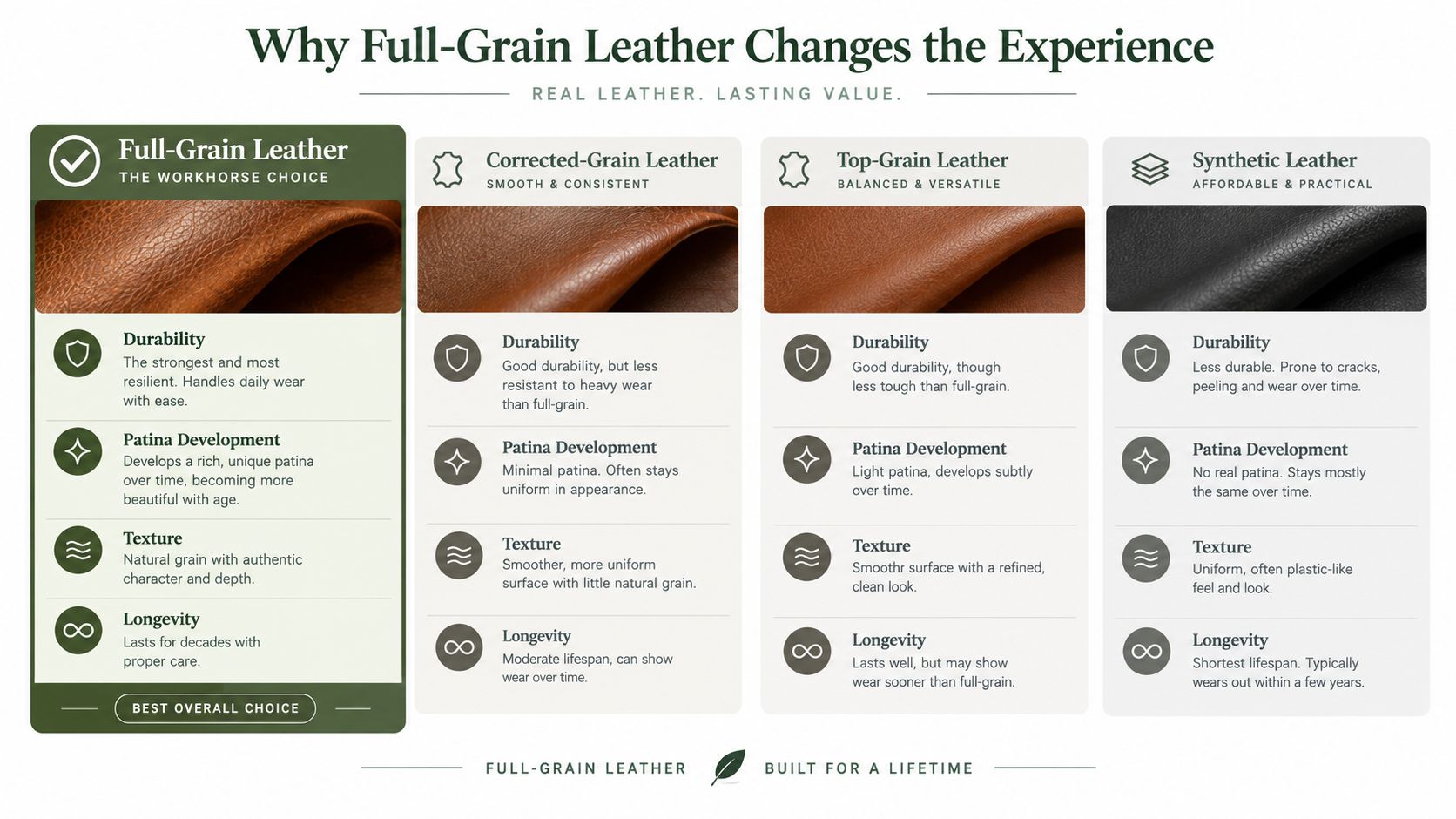
If you use a laptop document holder every workday, the material has to tolerate bending at the same points, pressure from the laptop's edges, and the minor abuse of transit. That's where full-grain leather tends to feel different from corrected leather or synthetic alternatives.
What changes over time
Full-grain leather keeps the outer grain layer intact. In practical terms, that usually means the surface doesn't just wear down. It ages into use. Light marks, handling oils, and daily contact tend to create patina rather than the plasticky cracking you see on some coated materials.
Corrected-grain and heavily finished leathers can look tidy at first, but they often trade away some of that natural character. Synthetics can be perfectly functional, especially if you care most about low weight or low cost, but they rarely improve with age.
A work accessory that gets handled every day should look better after use, not just older.
Why structure matters
A laptop adds concentrated weight in a narrow footprint. That stresses corners, seams, and the hinge area if the product opens like a folio. Full-grain leather's denser fiber structure generally holds shape well under repeated use, especially when paired with solid stitching and a rigid inner panel.
That matters more than people expect. A soft, collapsing holder often starts by feeling flexible. Later, it becomes annoying. Papers sag, the outline warps, and the product stops acting like a stable work surface.
If you want a deeper breakdown of the term itself, this guide to full-grain leather meaning is useful because many product pages use the phrase loosely.
Cost isn't only about purchase price
A cheaper holder can still be the right choice if you only carry it occasionally. But if it's your daily companion, replacement becomes part of the cost.
That's why some buyers prefer a simpler, better-made piece over a feature-packed one in weaker material. You're paying for shape retention, stitching durability, and a surface that can handle coffee-shop humidity, office air, and frequent handling without looking tired too quickly.
Sizing, Angle, and Posture Fundamentals
You feel sizing mistakes fastest on a crowded workday. The holder arrives, your laptop technically fits, but the corners press, the papers curl, and your hands end up shoved to the edge of the desk. That usually happens because the product was chosen like a sleeve, even though it has to work like a small workstation.
A laptop document holder has to support two things at the same time. The machine you carry, and the papers you still need to read, sign, compare, or annotate. In hybrid work, that matters more than many buying guides admit. The same holder may spend Monday on a dining table, Tuesday in a conference room, and Friday on a train tray table. Size, angle, and posture determine whether it helps in all three places or becomes one more awkward thing to manage.
Start with actual dimensions
Screen size is only a rough clue. Two 14-inch laptops can have very different footprints, hinge shapes, and thicknesses.
Check the holder's internal measurements against your laptop's real width, depth, and closed thickness. Then check your paper format. A holder that carries a device neatly can still work poorly if Letter or A4 pages sit too high, slide around, or lack support at the bottom edge. Legal-size documents need even more structure, especially if you review multi-page sets instead of a single sheet.
The easiest way to picture this is to treat the holder like a parking space with a reading shelf built into it. If the car fits but the door cannot open, the space fails. If the shelf exists but the papers sag, it also fails.
Size affects posture more than people expect
A compact holder is easier to carry, but it can crowd your working position. A larger one gives documents better support, yet it also takes more desk depth and can push the laptop too far back.
That tradeoff matters in hybrid setups because desks are rarely consistent. At a permanent office desk, a wider base can feel stable and comfortable. At a kitchen counter or shared touchdown space, the same footprint may leave too little room for your wrists, mouse, or notebook. Good sizing is partly about fit inside the bag, and partly about fit on the desk you use.
Laptop document holder size and angle reference
| Laptop Size | Internal Width Range | Compatible Paper Format | Recommended Tilt Angle | Typical Use |
|---|---|---|---|---|
| 13-inch | Check product dimensions against your device footprint | A4 or Letter for most users | Lower to moderate incline for compact desks | Commuting, coffee shops, short meetings |
| 14-inch | Check width and corner clearance carefully | A4 or Letter | Lower to moderate incline | General hybrid work |
| 15-inch | Look for more structure under the base panel | Letter, A4, sometimes slim Legal use | Moderate incline if used for reading | Desk-first setups |
| 16-inch | Prioritize rigid backing and hinge clearance | Letter, A4, and larger formats if supported | Moderate incline with enough desk depth | Heavier professional carry |
Angle changes the job the holder can do
A steeper angle usually helps when you are reading from paper and glancing back to the screen. Your neck rotates less, and your eyes travel a shorter distance.
A flatter angle tends to work better for writing, marking up pages, or resting your forearms naturally. One fixed position rarely handles both jobs equally well. If your day includes reviewing contracts in the morning and handwritten notes in the afternoon, an adjustable model usually makes more sense than a fixed folio shape.
Posture is the reason. The goal is not to force the document high at all costs. The goal is to keep your head from repeatedly dropping down and twisting sideways to read. Small changes in angle can make a holder feel either supportive or irritating after an hour.
Use a quick desk test before you buy
Mock up the holder with items you already own. Put your closed laptop on top of a book or folder close to the product's stated size, then place a few sheets where the documents would sit.
Check these points:
- Lid clearance: Open the laptop and see whether the hinge has room to move cleanly.
- Paper support: Slide a page in and out. It should stay supported instead of buckling at the bottom.
- Desk depth: Make sure your hands still have comfortable space in front of the setup.
- Viewing pattern: Look from screen to page several times. If your chin keeps dropping, the angle is too flat for reading.
This short test catches a lot of bad purchases. It also helps you choose between portability and comfort with clearer expectations. A slim holder may be perfect for travel days, while a slightly larger, more structured one may serve you better if your laptop document holder acts as part of your workstation several days each week.
Organization Features That Earn Their Space
Feature lists can make almost any holder sound useful. In reality, only a few built-in details affect daily work.
The question isn't “How much can this hold?” It's “What do I reach for often enough that it deserves a dedicated spot?”
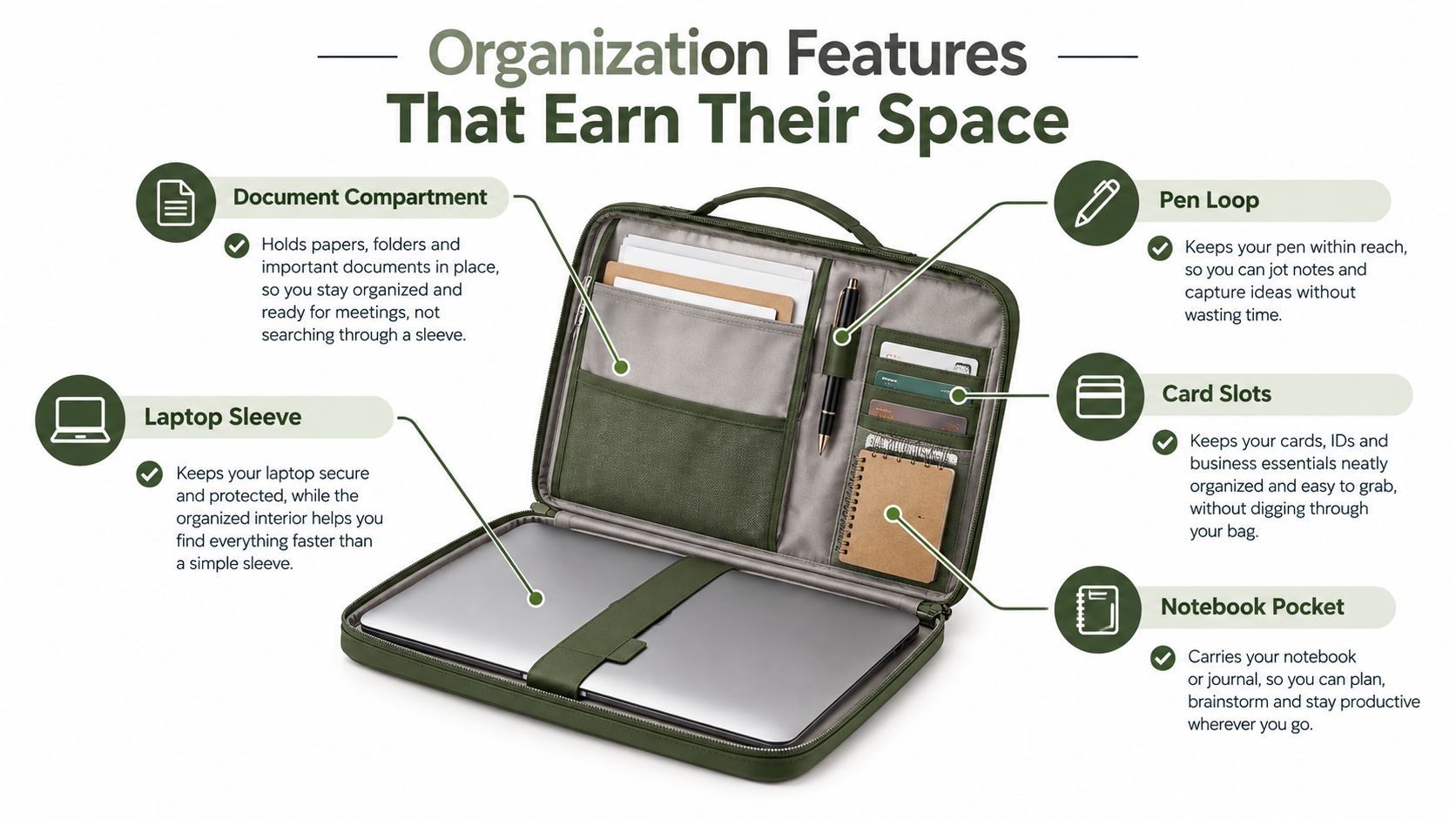
Features that usually pay off
- Pen loop: A single loop solves a common problem. Your preferred pen stays put, doesn't mark papers, and doesn't knock against the laptop.
- Card slots: Good for business cards, access badges, or a transit pass. Not a substitute for a wallet, which often adds thickness where you don't want it.
- Cable pocket: Useful if it stays slim. A charging cable or small adapter is worth carrying. A bulky pocket that creates pressure against the laptop usually isn't.
- Notebook sleeve: Helpful for people who always keep one thin notebook in rotation. Less useful if you already carry a bound planner elsewhere.
- Tablet compartment: Sensible only if you alternate between laptop and tablet work. Otherwise it becomes extra bulk.
Features that often sound better than they work
Magnetic closures can be elegant, but they aren't always ideal for one-handed access if the flap is stiff. Snap closures can feel secure, though repeated opening may be slower in meetings. Zippers protect contents best in transit, but they also make desk use feel less fluid.
Restraint matters. A laptop document holder that carries everything often becomes too thick to function gracefully on a small table.
Buy for the three items you always carry, not the ten items you might carry someday.
There's also a market shift behind this preference for flexible, compact designs. A recent report describes movement away from static copyholders toward portable, foldable, and multi-function products. It cites portable laptop stands with document-holder features as the fastest-growing segment at 7.2% CAGR with a 19.3% share in 2025, as stated in DataIntelo's market discussion on this category trend.
A Day in the Life of a Hybrid Professional
Monday starts at the kitchen counter, not a permanent desk. The laptop comes out first, then a slim holder with the meeting agenda, last week's annotated printout, and one pen already in place. Within a minute, the setup makes sense. The screen stays centered, the reference pages stay visible, and the workday begins without the small scramble of finding papers under the laptop sleeve or digging through a tote bag.
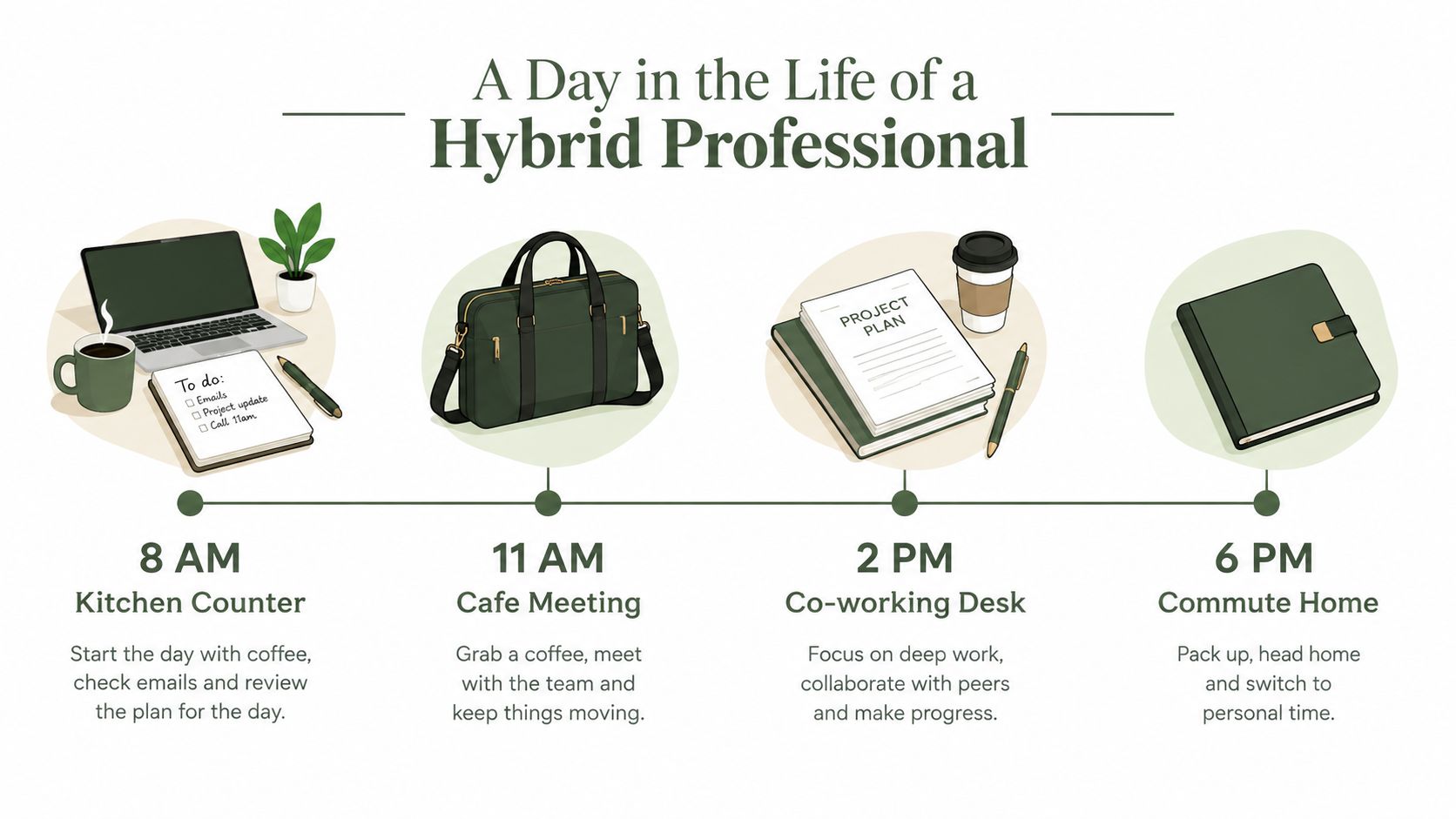
A few hours later, the setting changes. On the train, that same holder works like a protective layer between the laptop and everything else in the bag. Printed notes stay flatter. A notebook spiral does not press into the lid. Loose papers do not slide to the bottom and come back folded at the corners.
By midday, the user is at a coworking table or in a shared office. Now the value shifts from protection to continuity. The holder opens, the day's materials are still in the same order, and the person can move into a call or review session without rebuilding their workspace from scratch. That is the part many buying guides skip. In hybrid work, a holder is not just storage. It is a portable control panel for paper, device, and writing tools.
Hybrid schedules keep this paper-plus-device pattern relevant. Researchers at Gallup describe hybrid work as a common arrangement for many remote-capable employees, and Microsoft reports that distributed knowledge work still depends on people switching between locations, devices, and shared materials across the week (Gallup on hybrid work patterns, Microsoft Work Trend Index). That context matters because the buying question is rarely "Do I need a desk accessory?" The better question is "Do I need one item that protects my laptop in transit, keeps paper usable, and helps me set up quickly wherever I land?"
Late afternoon is usually the test. A client office, hotel desk, or borrowed conference room tends to be smaller, brighter, or more awkward than the morning setup. A good holder still feels predictable there. It opens cleanly, keeps key pages readable, and avoids adding clutter to a tight surface. A poor one starts to show its limits fast, especially if it was chosen for appearance alone.
The evening reset is simple. Keep the active notebook, the current document set, and the laptop. Remove receipts, old handouts, and anything that turned into bag ballast during the day.
That daily cycle explains why the laptop document holder has become more than a niche accessory. For a hybrid professional, it helps carry the shape of the workday from place to place.
Buying and Caring for the Right Holder
When you're comparing options, keep the order of decisions simple. Many buyers start with appearance and features, then work backward into fit. That usually leads to disappointment.
Start with what must be true on day one, then move to what will matter in month six.
A buying checklist that prevents most mistakes
- Confirm laptop fit first. Check the actual internal dimensions, not just the claimed screen size.
- Match your paper reality. If you use A4, Legal, printed decks, or thick note pads, make sure the holder supports them without curling edges.
- Choose by work pattern. Desk-heavy users may want integrated support. Meeting-heavy users may prefer a folio or slim portfolio.
- Inspect structure. Look closely at stitching, corners, edge finishing, and whether the base seems rigid enough to support both laptop and paper.
- Limit organization to what you use. Two or three useful compartments beat a bulky interior full of rarely touched pockets.
One practical option in this space is Grainmark Leather's broader portfolio and laptop carry range, which includes formats relevant to professionals who want structured leather organization for devices and papers without moving to a large briefcase.
Common buying errors
- Buying one size too small: This is the most common miss. Tight fit looks neat online and becomes annoying in real use.
- Choosing softness over structure: If the item folds too easily in your hands, it may not perform well as a working surface.
- Overvaluing extra pockets: More storage can mean more bulk, more seam stress, and less comfort on cramped desks.
- Ignoring closure style: The way it opens matters if you access it several times a day.
Care habits that keep it useful
Leather doesn't need constant fuss, but it does need basic maintenance. Wipe spills promptly. Don't leave it in prolonged direct sun. Store it flat when possible so the shape stays consistent.
Conditioning matters too, especially if the leather starts to feel dry from indoor heating or frequent travel. This guide on how to condition leather covers the maintenance basics in a straightforward way.
If a holder feels easier to use after a month of daily carry, you chose well. If it already feels like one more thing to manage, you didn't.
There's a wider market context here as well. The broader global laptop stands and holders market was valued at approximately USD 1.85 billion in 2023 and is forecast to reach USD 3.42 billion by 2033, implying 6.3% CAGR from 2025 to 2033. The same source lists North America as the largest region, with 2024 regional revenue estimated at USD 725.6 million, versus USD 512.3 million in Europe and USD 438.7 million in Asia Pacific, according to Data Horizzon Research's laptop stands and holders market report.
That growth doesn't mean every product is worth buying. It means more people are trying to solve the same friction you feel at your desk. The smart purchase isn't the one with the most claims. It's the one that matches your documents, your laptop, and the places you work.
If you want a leather option that fits into this kind of paper-plus-device workflow, Grainmark Leather offers full-grain leather bags, sleeves, and portfolio-style carry pieces built for professional organization. Their range is useful if you're trying to move from improvised laptop-and-paper carry to something more structured and durable for daily work.