Full Grain Leather Laptop Sleeve: Buyer's Guide for 2026
You've found a leather sleeve that looks right for work, but the listing leaves the important questions unanswered. Will your laptop fit, is there padding beneath the leather, and can you put the computer away while it's still warm from a video call?
A full grain leather laptop sleeve can be a sensible long-term purchase. But leather quality alone won't protect your computer. Buy for the closed device's dimensions, the sleeve's internal construction, and the way you carry and shut down your laptop.
Table of Contents
- Start With the Right Sleeve Size for Your Laptop
- What Full Grain Leather Means for a Laptop Sleeve
- The Layers That Protect Your Laptop
- Full Grain Compared With Other Leathers
- How a Full Grain Sleeve Ages Over Years
- When Heat and Fit Limit What a Sleeve Can Do
- Care and Maintenance for Full Grain
- Choose a Sleeve You Will Keep for Years
Start With the Right Sleeve Size for Your Laptop
Ordering by screen size is how you end up with a laptop that rattles inside its sleeve or won't slide past the opening. The screen label doesn't tell you the size of the chassis, hinge, feet, or protective shell.
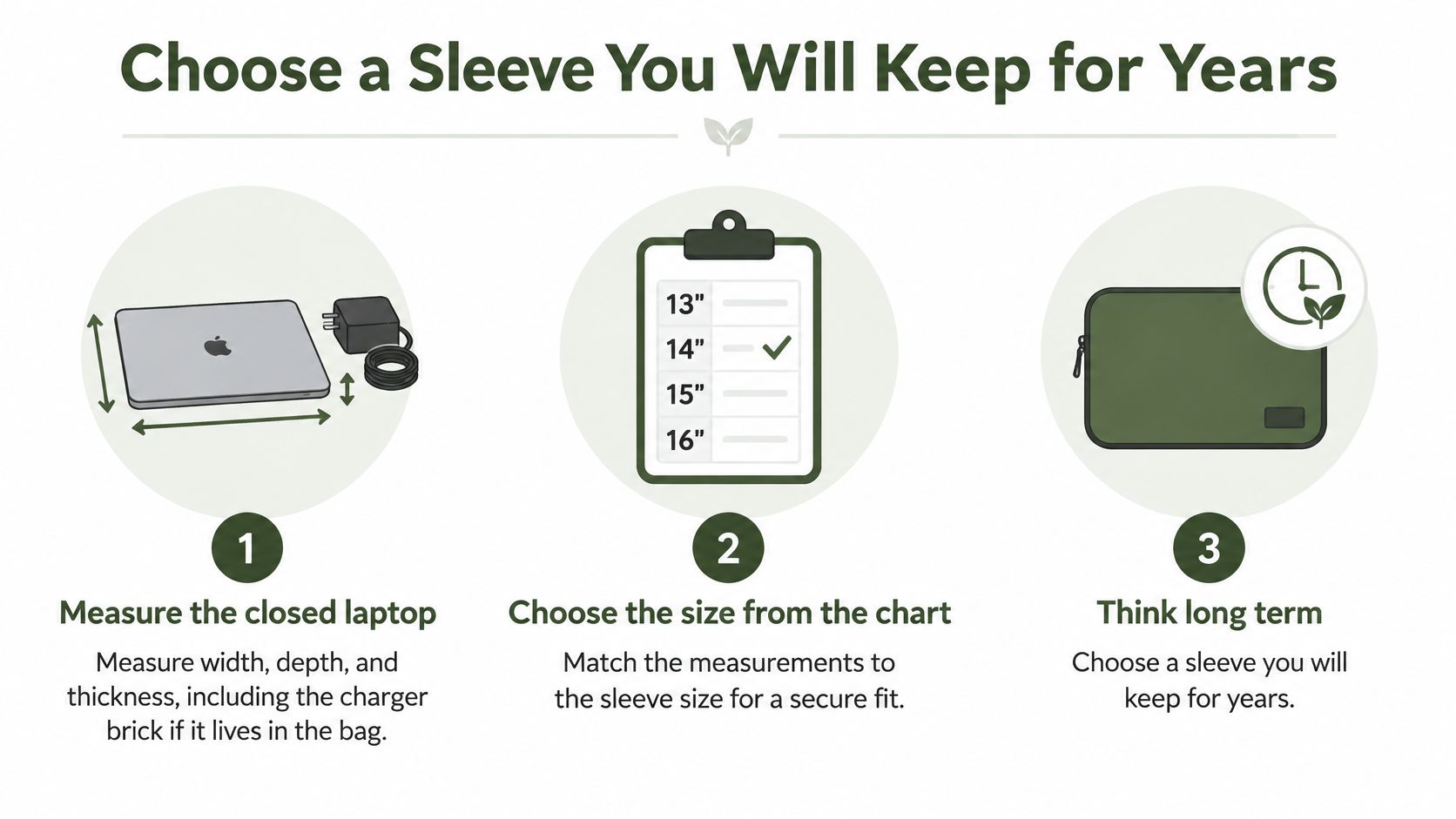
Measure the laptop closed, using a ruler or tape measure on a flat desk. Record its width from side to side, depth from front to back, and thickness at the thickest point, including any feet or case you intend to leave attached.
Measure the device, not the diagonal
Keep the charger out of the laptop compartment. If it travels in the same bag, measure it separately and allow for a dedicated accessory pocket. A charger brick pressed against the lid creates a hard contact point rather than useful protection.
Sleeve size by laptop screen size
These are shopping categories, not guaranteed fits. The allowance column gives a practical fit rule rather than an unsupported universal measurement.
| Laptop screen | Sleeve size to buy | Allowance over closed width | Fit notes |
|---|---|---|---|
| 11 to 12 inch | 12-inch sleeve category | Enough clearance to slide past the lining without forcing | Light devices still need protected corners |
| 13 to 13.6 inch | 13-inch sleeve category | Check usable internal width against the closed chassis | Measure thickness with any attached shell; store the charger separately |
| 14 to 14.2 inch | 14-inch sleeve category | Allow clearance without sideways movement | Measure depth too, particularly around the hinge |
| 15 to 16 inch | 15-16 inch sleeve category | Choose extra internal room for a thicker chassis | Gaming and workstation laptops need particular attention to depth and thickness |
| 17 inch and up | 17-inch sleeve category or briefcase | Use measured internal dimensions, not the size label | Check opening width and consider a dedicated briefcase compartment |
The listing should state inside dimensions, not just the outside dimensions of the finished leather article. Padding, seams, and zipper placement all reduce usable space. Check the supported laptop generation as well, because a familiar model name doesn't guarantee an unchanged body.
If your computer, charger, documents, and mouse all need to travel together, compare leather laptop briefcases rather than stretching a sleeve into a small bag.
Fit rule: Choose usable internal dimensions that let the closed laptop enter without pressure, while preventing it from sliding around once the closure is secured.
Don't buy a tight sleeve on the assumption that the leather will stretch. The lining, seams, and closure may not give with it.
What Full Grain Leather Means for a Laptop Sleeve
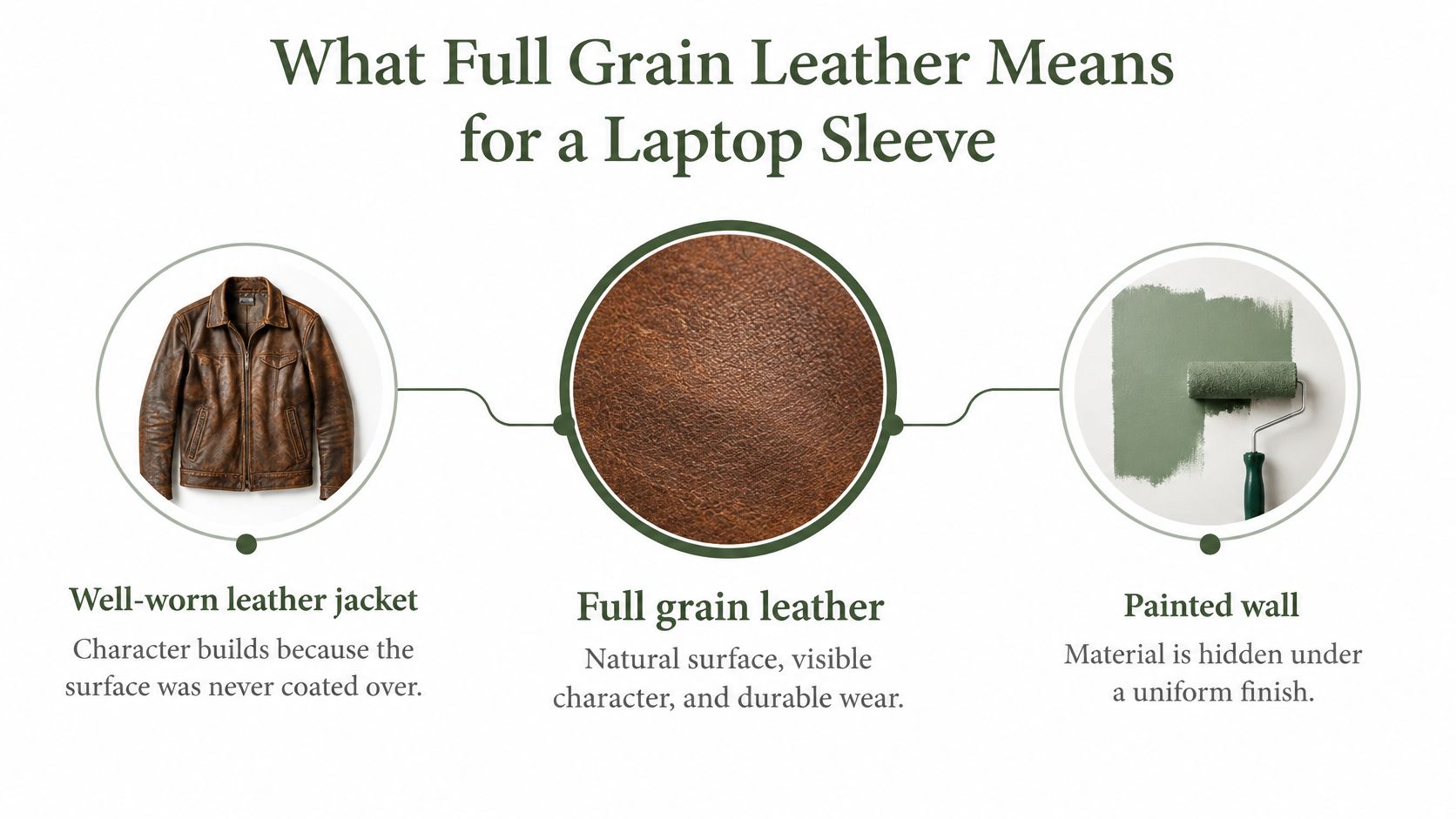
Think of a well-worn leather jacket beside a painted wall. With the jacket, you notice texture, creases, and changes from handling. With the wall, you mostly see a uniform finish covering the material beneath.
That's a useful analogy for retained natural grain, although full grain leather can still have a protective finish. Full grain doesn't mean completely untreated, uncoated, or waterproof. It means the hide's natural grain hasn't been heavily sanded away to create a corrected surface.
What the retained surface gives you
The Refashion leather guide describes full grain as retaining the complete natural grain and explains that full grain and some vegetable-tanned leathers generally age well and remain more repairable than corrected or heavily pigmented leather.
For a sleeve, that makes the material worth considering as something you maintain rather than replace when its appearance changes. Natural wrinkles, small marks, and slight colour differences can remain visible. They aren't automatically defects, although a deep cut or weakened patch shouldn't be excused as character.
Say you're choosing between two brown sleeves. One has subtle differences between its front and back panels; the other looks perfectly identical across every surface. The first may reveal more natural grain, but photographs alone can't establish either leather's grade.
Check the description as well as the photos
Use these checks together:
- Look for natural variation. Grain should have irregularity rather than an obviously repeating printed pattern. Photos can suggest this, but they aren't proof.
- Compare the panels. Small differences in texture and colour are compatible with natural leather. Perfect uniformity can come from finishing, careful selection, or image editing.
- Find a named material. A clear full grain specification tells you more than a vague genuine leather label. Ask whether the description covers the entire exterior or only selected panels.
For more context on how sourcing and finishing affect what you're buying, you can explore leather production and quality assurance with Alexander Noel.
The practical benefit isn't that full grain stays pristine. It's that an appropriate finish, sound construction, and repairable components can make cosmetic wear acceptable rather than a reason to discard the sleeve.
The Layers That Protect Your Laptop
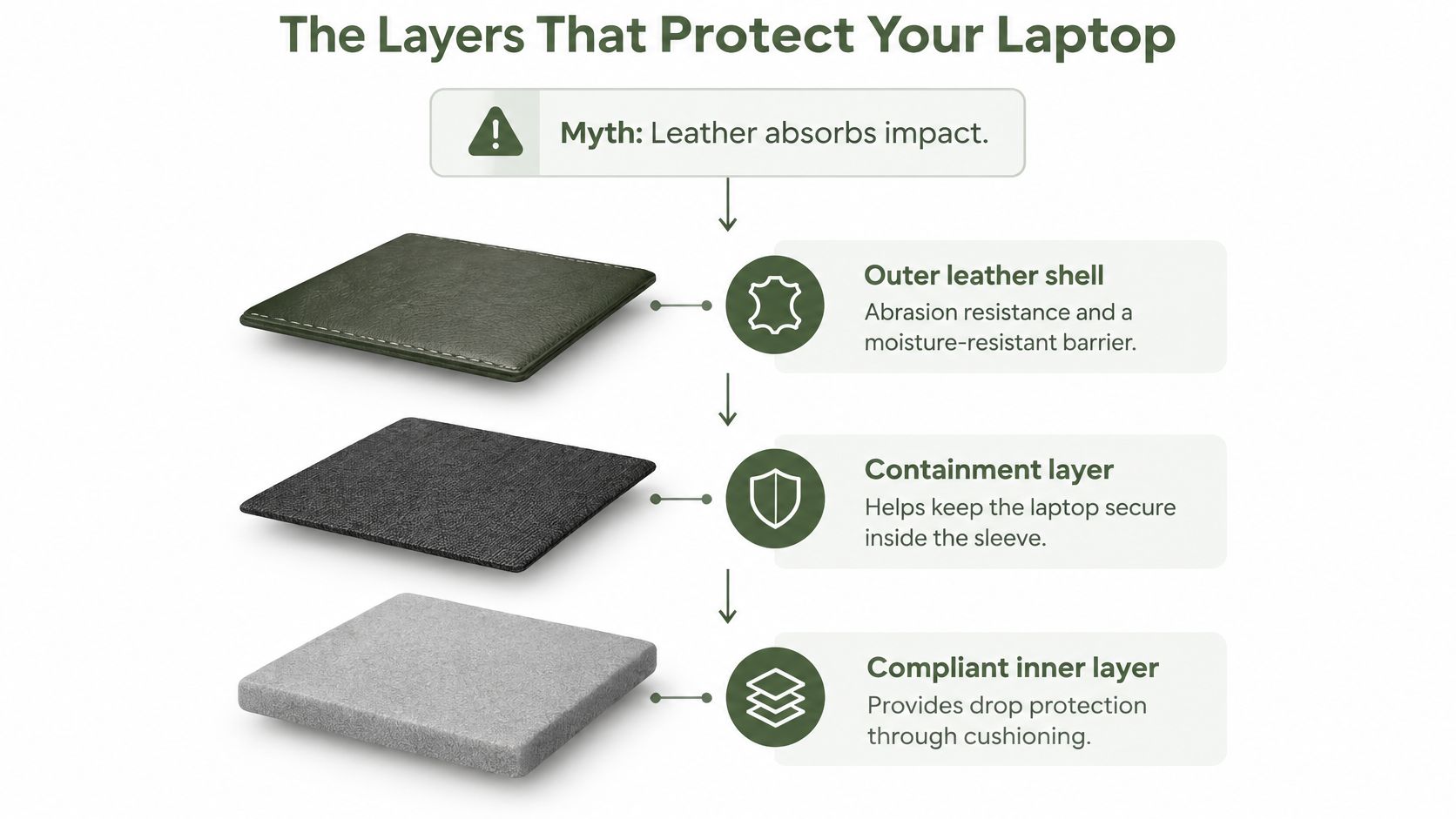
Thick leather isn't a substitute for cushioning. Its useful jobs are resisting abrasion, holding the contents together, and providing a moisture-resistant exterior. Don't treat that exterior as either a waterproof seal or a complete impact-protection system.
Drop protection requires a compliant layer that can compress before the computer meets a hard boundary. A sleeve can look substantial and still leave the laptop's corners almost directly against a seam.
Inspect from the outside inward
Start with the leather panels and edge construction. Look for secure stitching, a closure that retains the device, and corners that don't leave an exposed route to the laptop.
Next, inspect the lining. It should feel non-abrasive, lie flat, and cover internal seam allowances or hardware that could rub against the lid. Our comparison of suede lining versus fabric helps distinguish surface feel from the other qualities an interior needs.
Finally, locate the cushioning. Press the base and corners, not just the broad front panel. Those are separate construction decisions, and a soft-looking face doesn't prove that the bottom edge has meaningful padding.
Balance cushioning against bulk
A Best Desk Gear comparison of sleeve materials identifies closed-cell neoprene around 3–4 mm thick as a lightweight impact absorber, notes that memory foam can absorb more energy per millimetre, and describes foam-lined rigid shells as generally offering greater drop protection at the cost of bulk and weight.
Those are material comparisons, not a protection rating for every finished sleeve. Foam placement, compression, device mass, and fit still affect the result. More padding also takes up room inside your work bag, so check the complete carrying arrangement before buying.
A thin leather sleeve can make sense inside an already padded laptop compartment. For carrying a computer by itself through crowded stations, I'd put greater weight on corner coverage and a secure closure than on a particularly slim profile.
Construction checklist
- Lined interior: No exposed rough seams, rivet backs, or abrasive labels against the laptop.
- Padded base: Cushioning continues beneath the device rather than stopping at the face panels.
- Protected zipper path: A fabric or leather guard separates the laptop from the teeth and slider.
- Sound edges: Stitching is secure, with no open corner gaps or loose thread at stressed areas.
A military-style label isn't a promise that your laptop will survive a fall.
Ask for the actual test conditions behind any drop claim: the device used, drop height, landing surface, orientations, and repetitions. Without a tested sleeve-and-device combination, don't interpret a general protection claim as a survival guarantee.
Full Grain Compared With Other Leathers
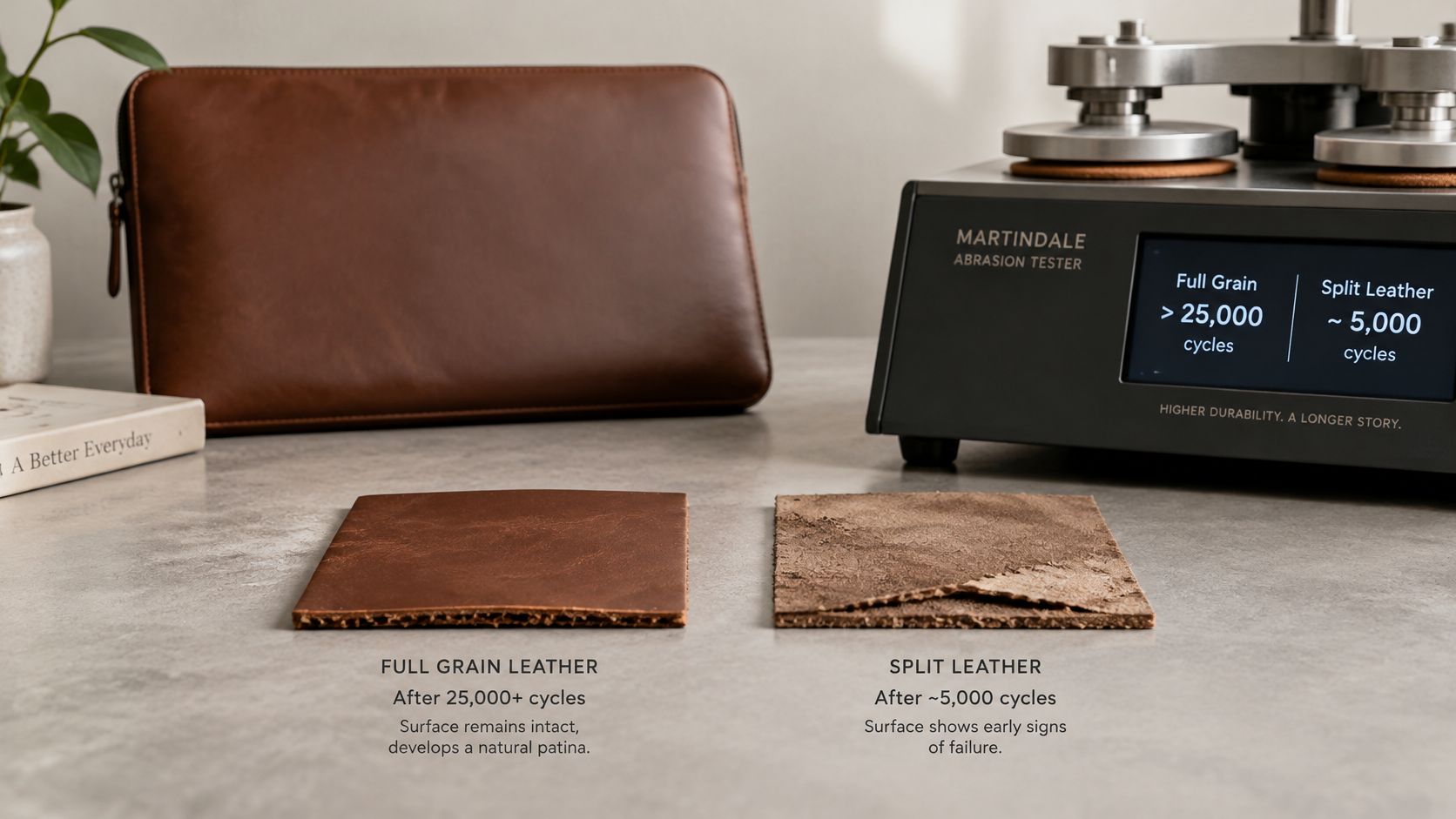
A Szoneier Leather durability guide reports more than 25,000 Martindale abrasion cycles before visible wear for approximately 1.2 mm full grain leather, compared with roughly 5,000–7,000 cycles for split leather.
Treat that as a reported material benchmark, not a warranty for a finished sleeve. Thickness, finish, and testing conditions matter. A cycle count also doesn't tell you whether the stitching, lining, or zipper will last.
Know what the labels actually tell you
Full grain retains the dense outer grain structure. Other descriptions may tell you about sanding, coatings, or composite construction, but sellers don't always use them consistently. In particular, genuine leather isn't a precise grade and shouldn't automatically be read as split leather.
Leather types for a laptop sleeve
| Leather type | How it is made | Look and wear | Repairability | Best use |
|---|---|---|---|---|
| Full grain | Retains the complete natural grain layer | Natural variation; lightly finished surfaces develop visible patina | Often good, subject to finish and damage | Daily carry where long-term wear matters |
| Top grain | Commonly used commercially for grain leather with a sanded or refined surface | More even appearance; performance follows the finish | Assess the coating and construction | A smoother-looking sleeve with clearly stated materials |
| Corrected or genuine leather | Corrected leather has an altered surface; genuine alone doesn't identify construction | Corrected finishes look uniform; genuine alone predicts little | Check the actual substrate and finish | Budget-conscious buying with a detailed specification |
| Bonded leather | Leather fibres combined with binders | Uniform surface; deterioration can involve the composite layer | Usually limited once the composite breaks down | Not my choice for regular commuting |
| PU leather | Synthetic polyurethane surface, commonly on a backing | Uniform appearance; coating condition matters | Limited when the coating separates or cracks | Price-led, light-use purchases |
For a fuller explanation of terminology, consult our guide to grades of leather before comparing listings.
Choose the trade-off you can live with
Lightly finished full grain can show a fingernail scuff sooner than heavily coated corrected leather. That doesn't necessarily mean it has worn through sooner. Superficial marks and structural failure are different things.
I'd choose clearly specified full grain for a sleeve intended for regular use over the long term. But I wouldn't reject a well-constructed top grain sleeve merely because its surface has been refined. A sound padded sleeve made from a less prestigious leather can be the better purchase than an unlined full grain envelope.
How a Full Grain Sleeve Ages Over Years
Consider a commuter who takes the same laptop between home, the office, and a shared workspace. The sleeve gets handled at the opening, placed on desks, and pushed into a bag. Those contact points won't all age alike.
Early on, the most noticeable changes may be small scuffs around the corners and a smoother feel where the hand grips the leather. Later, those areas can become darker or more polished while less-handled panels stay comparatively matte.
Expect a pattern, not a timetable
There isn't a reliable calendar for patina. Finish, colour, exposure, and handling all affect its appearance, so don't expect a sleeve to match someone else's anniversary photograph.
As use continues, inspect the interior separately. A lining can become thin, bunch up, or expose a seam while the outer leather still looks attractive. Likewise, a softened opening is acceptable only while the closure continues to retain the laptop securely.
Our guide to full grain leather lifespan offers more context for judging useful service life rather than appearance alone.
Signs of healthy aging
- Gradual tonal change: Contact areas darken or polish without the surface breaking apart.
- Flexible folds: Creases move without opening into deep cracks.
- Stable construction: The sleeve retains its shape and the seams remain secure.
Signs that need attention
- Flaking or powder: The surface is shedding material rather than changing colour.
- Rigid, cracking edges: Flexing opens splits instead of shallow creases.
- Functional deterioration: Loose stitching, exposed hardware, or displaced padding threatens the laptop.
Separate cosmetic wear from a repair
Run a clean fingertip across a suspicious mark with the laptop removed. A smooth change in sheen is different from a lifted flap, sharp cut, or opening seam.
Don't keep rubbing, conditioning, or polishing a damaged area in the hope of making it disappear. Deep cuts and failed stitching need assessment or repair. Patina changes the appearance; damage compromises the material or the sleeve's function.
When Heat and Fit Limit What a Sleeve Can Do
A sleeve isn't automatically safe storage just because the laptop fits inside it. A sleeping computer can still generate heat, and a closed sleeve restricts the airflow that would otherwise help remove it.
The Hampshire College laptop-care guide advises shutting down a laptop before putting it in a bag and warns against operating it inside a bag or on soft surfaces that block ventilation. That matters when you're packing between meetings, boarding a train, or leaving a demanding task running.
Pack the computer, not a running workload
Use these habits before closing the sleeve:
- Shut down before bagging. Don't rely on closing the lid, particularly if the computer feels warm or has previously resumed unexpectedly.
- Let it cool after intensive work or charging. Leave it uncovered on a firm, ventilated surface before packing it.
- Take it fully out to work. Don't operate it half-inserted in the sleeve, and don't place it on a bed, sofa, or cushion that obstructs its vents.
- Treat excessive battery heat seriously. If the battery area becomes too hot to handle, stop using the device and seek appropriate service advice. A different sleeve isn't a fix for a battery fault.
- Avoid hot storage locations. Don't leave the packed laptop in a parked car or against a sunny window.
If overheating continues while the computer is uncovered on a suitable desk, the laptop overheating advice from IT Cloud Global is a useful troubleshooting resource. Packing habits and computer faults need different responses.
Storage isn't operation: Extra clearance inside a sleeve doesn't turn it into a ventilated enclosure.
Test fit without forcing anything
With the computer closed and cool, support the sleeve and try withdrawing the laptop with one hand. You shouldn't need to bend the opening, tug on the screen edge, or squeeze the chassis.
Then check that the closure shuts without pulling across the hinge or pressing a connector into a port. Don't leave a charging cable attached inside a closed sleeve.
For commuters, the useful compromise is secure but uncompressed. The laptop should remain contained during ordinary handling without pressure from an overfilled accessory pocket or a closure stretched to its limit.
Care and Maintenance for Full Grain
Keep maintenance gentle. A sleeve holds electronics, so remove the laptop before cleaning and let the interior and exterior dry completely before using it again.
Different finishes respond differently to conditioner. Start with the maker's material guidance, and don't assume every product labelled for leather suits every full grain surface.
A practical care routine
- Lift dust with a soft, dry cloth. Pay attention to the opening and seams where grit collects. Empty the interior and remove loose particles without scraping the lining.
- Blot spills promptly. Use a clean cloth, barely damp if necessary, without saturating the leather. Let it air-dry away from radiators, hair dryers, and direct heat.
- Condition sparingly when appropriate. Test a compatible leather conditioner on a concealed area first. Apply a thin film, allow it to settle according to the product instructions, and buff away residue.
- Store it without pressure. Remove the computer, keep the sleeve dry, and don't fold it or stuff it with objects that distort the panels.
- Inspect before treating. A polished patch doesn't need correction. An opening seam, cracking edge, or shedding surface needs a different response from routine conditioning.
Our instructions on how to condition leather explain the process in more detail.
Don't turn care into over-treatment
More conditioner isn't better protection. Excess product can leave a greasy surface, alter colour, or transfer residue to other belongings. Keep treatment off the lining unless the lining's care instructions specifically permit it.
Set a calendar reminder to inspect the sleeve, rather than automatically apply another coat. Check flexibility, surface dryness, stitching, and lining condition, then act on what you find. A brief inspection is more useful than repeatedly polishing an already supple panel.
Choose a Sleeve You Will Keep for Years
Choose the sleeve in this order: fit, construction, then appearance. That keeps an attractive grain pattern from distracting you from an unusable opening or an unprotected base.
Make a short, evidence-based shortlist
- Record the closed dimensions. Compare them with usable internal measurements and keep the charger in separate storage.
- Read the material specification. Look for an identified outer leather, not just a photograph or an ambiguous label.
- Confirm the protective construction. Request interior and corner photographs if the listing doesn't show them clearly.
Our 14-inch Laptop Sleeve – Classic Fit is one option to assess against those requirements. It has a sale price of €86.36 and comes in Burgundy and Coffee. We offer a 1 Year Guarantee; review its terms at checkout before buying, and don't treat the product's size label as a substitute for checking your device.
For a coordinated work wardrobe, The Dressed Man's budget-friendly clothing choices for men can help with the clothing side of the purchase. Keep the sleeve decision grounded in utility rather than buying accessories because they match.
Measure your computer before ordering, inspect the sleeve when it arrives, and start with sensible storage habits immediately. If it requires force to fit or leaves a corner against hard hardware, return to the shortlist rather than hoping use will fix it.
Grainmark Leather offers full grain leather goods for work and travel, including a laptop sleeve to compare with your device and carrying needs. Visit Grainmark Leather with your closed laptop measurements ready, check the fit and construction details, and choose only once those requirements are satisfied.