How to Choose a Briefcase Organizer Insert
You're at the train door with one hand on your briefcase and the other searching for a pen. The contract is in there somewhere, folded against a charger. Your laptop has slid over your notebook, and the signed form you need first is at the bottom. That small, ordinary scramble is why a briefcase organizer insert exists. It's not about carrying more. It's about knowing where each thing sits before you open the case.
Table of Contents
- Why a Briefcase Still Needs an Organizer
- What a Briefcase Organizer Insert Does
- Full-Grain Leather Construction That Lasts
- Sizing an Insert for a Packed Briefcase
- Compartment Layouts That Stay Easy to Use
- Carry Setups for Papers Pens and Devices
- Leather Care and Your Next Buying Step
Why a Briefcase Still Needs an Organizer
A hybrid workday rarely travels light or fully digital. You leave your desk with a laptop for the train, a notebook for a client meeting, and a printed contract because someone needs a wet signature. A charger, a pen, and your identification go into the same main compartment because that's the bag you're carrying today.
By the time you've walked, sat, and stood again, those items have sorted themselves by weight. Dense objects sink. Papers slide. A pen finds the corner furthest from your hand. The case hasn't failed you. It has one open space doing several different jobs.
Paper Has Shrank, Not Disappeared
That mix isn't a personal habit you're supposed to have outgrown. Quocirca's 2024 research found more than 70% of surveyed organizations still considered printing important to business processes, while only 11% described themselves as fully paperless, as summarized in Quocirca's paperless workplace research.
The same research shows a transition, not a sudden end. 75% of organizations were accelerating plans to digitize paper-based processes, businesses expected print volumes to decline by approximately 3% over the following year, and scanning volumes were projected to increase by 6%. If your bag holds fewer papers than it once did, but still holds some, you're living exactly in that transition.
- Contracts and signed forms: They still travel because a signature or original is required.
- Identification documents: You carry them separately from loose notes for a reason.
- Presentation notes and client paperwork: They need to arrive flat, readable, and in order.
A Layer for Hybrid Carry
A briefcase organizer insert gives those selected physical items a structured home alongside digital tools. Papers stay supported in one place. Pens, cards, chargers, and small devices stop migrating across the case. You're not preserving a paper-only office. You're managing the hybrid load you carry every day.
An insert earns its place when paper, a notebook, and tech travel together and each needs to be found without unpacking the others.
The briefcase began as a portable professional document container. An insert extends that original organizing job inside contemporary bags that weren't built as specialist briefcases. It adds structure where a general-purpose work bag offers only volume, and it does so without forcing you to replace a bag you already like carrying.
What a Briefcase Organizer Insert Does
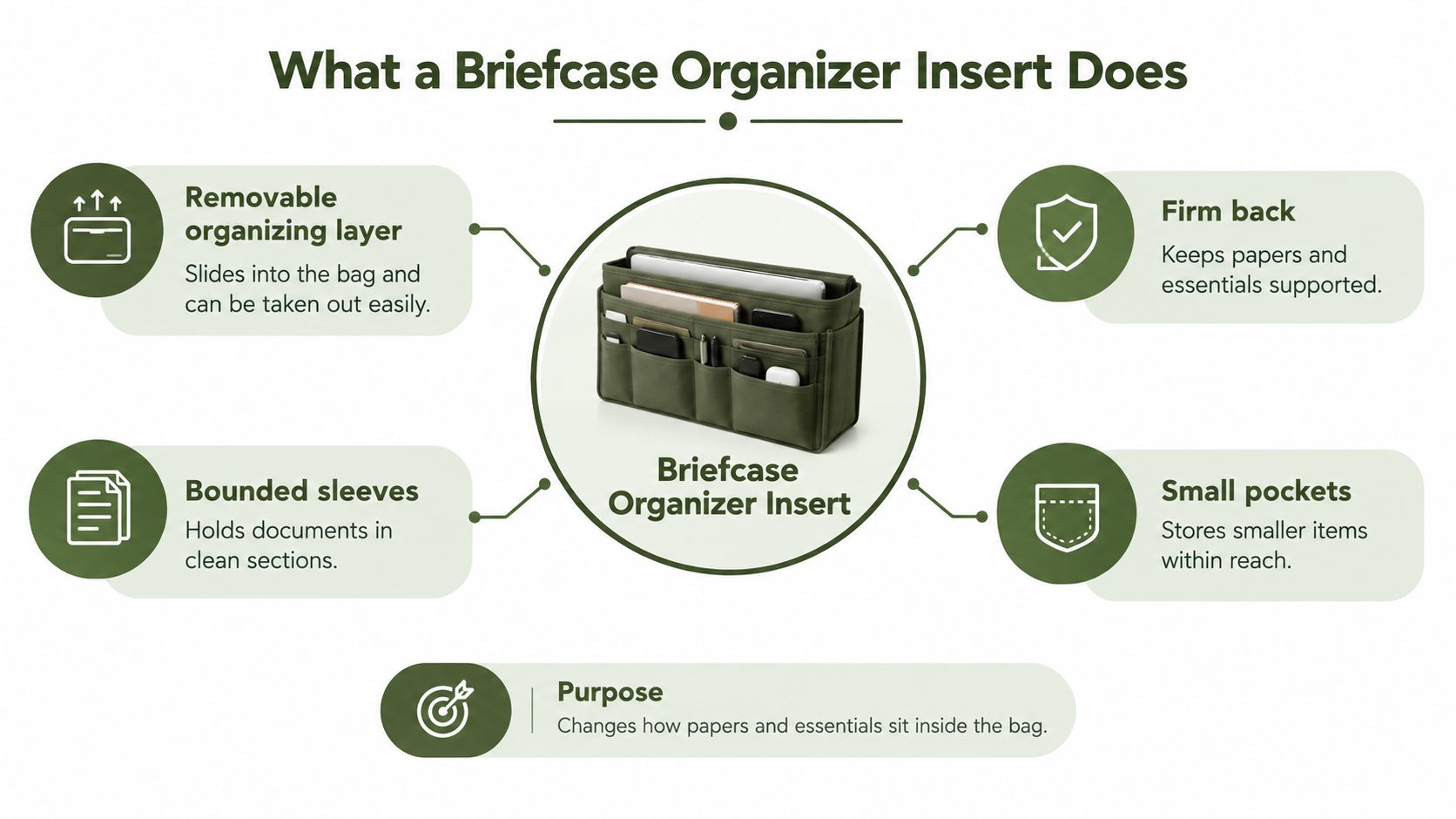
Think of the insert as a removable organizing layer that sits between loose contents and your briefcase's main compartment. It has a firm back, bounded sleeves for documents, and smaller pockets for the items that otherwise disappear. You load it once, then move that loaded set from one bag to another.
The closest everyday comparison is a filing folder that can travel. A folder keeps related papers together on a desk. An insert does the same work in motion, and it adds places for pens, cards, and small electronics so they don't ride against the paper.
Why Separation Matters for Confidential Paper
Paper persists for practical reasons, not nostalgia. A 2022 Quocirca survey reported that 52% of organizations had not fully digitized payslips and 69% still stored customer records in paper form, according to the 2022 Quocirca survey summary from PFU.
The reasons matter for how you pack. 39% cited legal-compliance requirements, 29% identified customer needs, and 25% cited employee preference. Security cuts both ways. 41% of paper documents were reportedly left lying around offices, creating exposure, while 22% of respondents said they chose paper over digital formats for security reasons.
Dedicated sleeves respond directly to that tension. A confidential sheet in its own sleeve isn't interleaved with a notebook or visible every time you reach for a charger. Separation reduces casual exposure during a commute, and it reduces the chance that a document slips out when you pull something else free.
What Changes in Daily Use
- Modular transfer: You lift one organized set of essentials into a different briefcase, backpack, or portfolio without rebuilding it item by item.
- Faster retrieval: Bounded pockets give pens, cards, and cables a fixed address, so your hand learns the layout.
- Less searching: You stop emptying the main compartment to confirm that a small item is still there.
Document organization has moved from filing cabinets and fixed office storage toward portable, personal systems. A briefcase organizer insert fits that shift. It doesn't create order by adding volume. It creates order by assigning boundaries, so the set you packed at your desk is still the set you find on the train.
Full-Grain Leather Construction That Lasts
An insert is only as stable as the material holding its shape. If the shell softens into a pouch, the sleeves slump with it. If the lining is rough, paper corners pay for every mile. Material choice isn't decoration here. It's the structure your documents lean on.
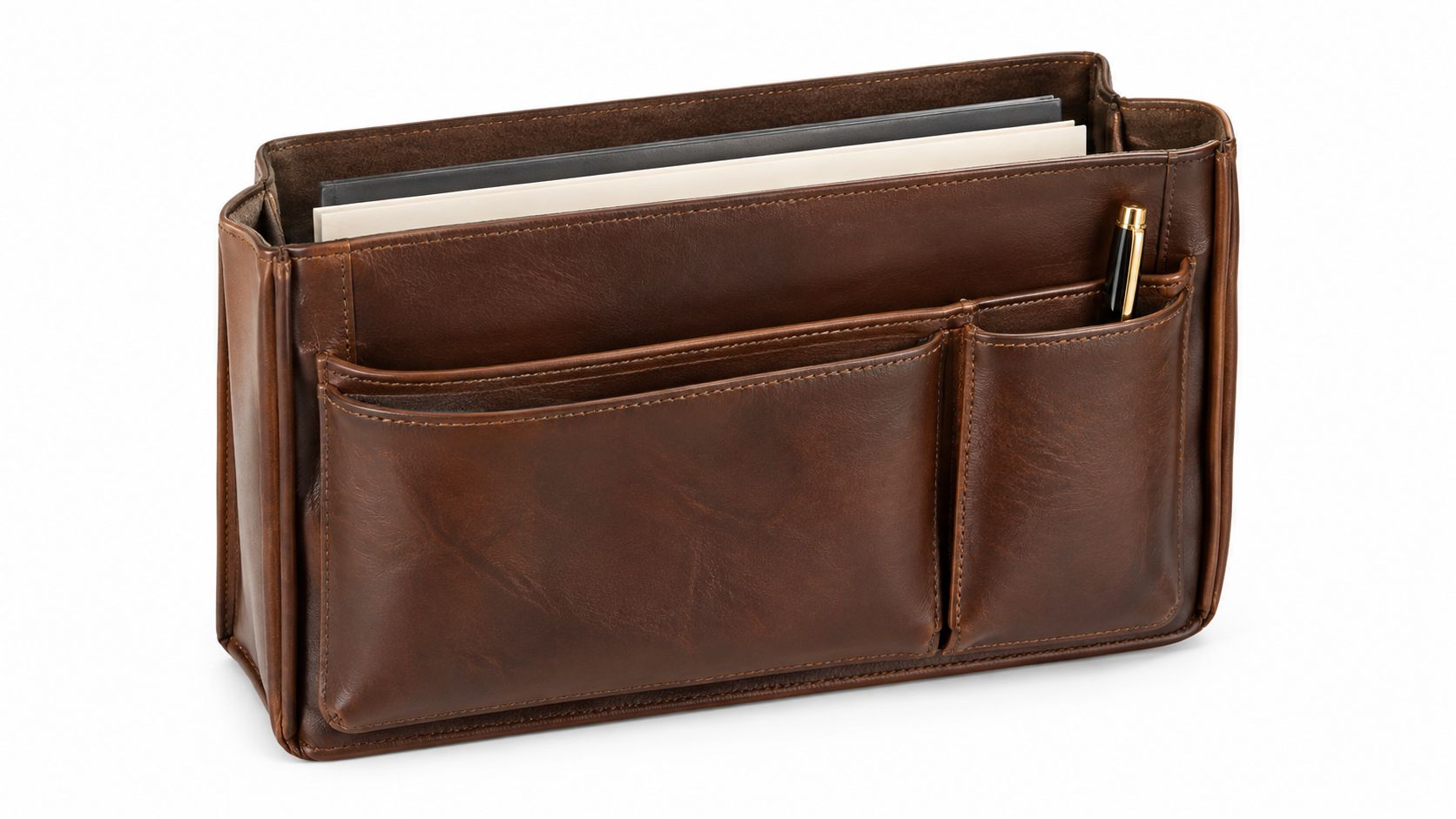
Full-grain cowhide keeps the hide's outer layer intact. That outer layer is the densest part of the hide, and it hasn't been sanded down before you start bending it daily. When you open, close, and flex the insert thousands of times, you're working a surface that began whole.
How to Read the Surface in Your Hand
Corrected and split leathers take a different starting point. Their surfaces are sanded or separated to look even, which can look tidy on day one. Once that grain is gone, the material has less to give when bending concentrates along the same fold. Evenness at purchase isn't the same as strength in use.
Crazy horse leather makes the behavior easy to see. It's full-grain cowhide finished with natural waxes or oils and left unsanded. When you bend it, scratch it, or rub it, the wax shifts and the area turns lighter or darker. The mark isn't a coating cracking. It's the finish moving, and it usually blends back as handling continues.
If you want the underlying categories explained plainly, this guide to leather grades lays out how full-grain differs from corrected and split options. Use it to check product descriptions against what you're holding.
Construction You Can Check Before You Buy
- Semi-rigid back or base: Press it. The panel should resist folding so papers stay supported instead of curling around softer contents.
- Stitching at stress points: Look where sleeves meet the back panel and where pockets are opened daily. Even, tight stitching there takes repeated pulling.
- Lining texture: Run a sheet of paper along it. A lining that drags or feels abrasive will scuff corners over time.
- Closing hardware: Where a pocket closes, a zipper should run without catching when the pocket is empty and when it's loaded.
Practical rule: Judge durability by how the hide and seams behave under bending and daily opening, not by how uniform the surface looks under shop lighting.
A briefcase organizer insert in full-grain leather won't stay pristine. It'll record handling in its finish. What it should do is keep its shape, keep its stitching, and keep paper from paying for the journey.
Sizing an Insert for a Packed Briefcase
Most fit problems don't appear in an empty bag. An insert drops in easily, the case closes, and the purchase feels settled. Then you add the laptop in its shell, a stack of documents, and a charger, and the same insert either jams the zipper or lets everything shift.
Treat compatibility as a packed-case test, not a screen-size label. A 14-inch or 16-inch tag tells you about a display diagonal. It tells you nothing about the closed laptop's width, depth, thickness, corner height, or the shell you've added to protect it.
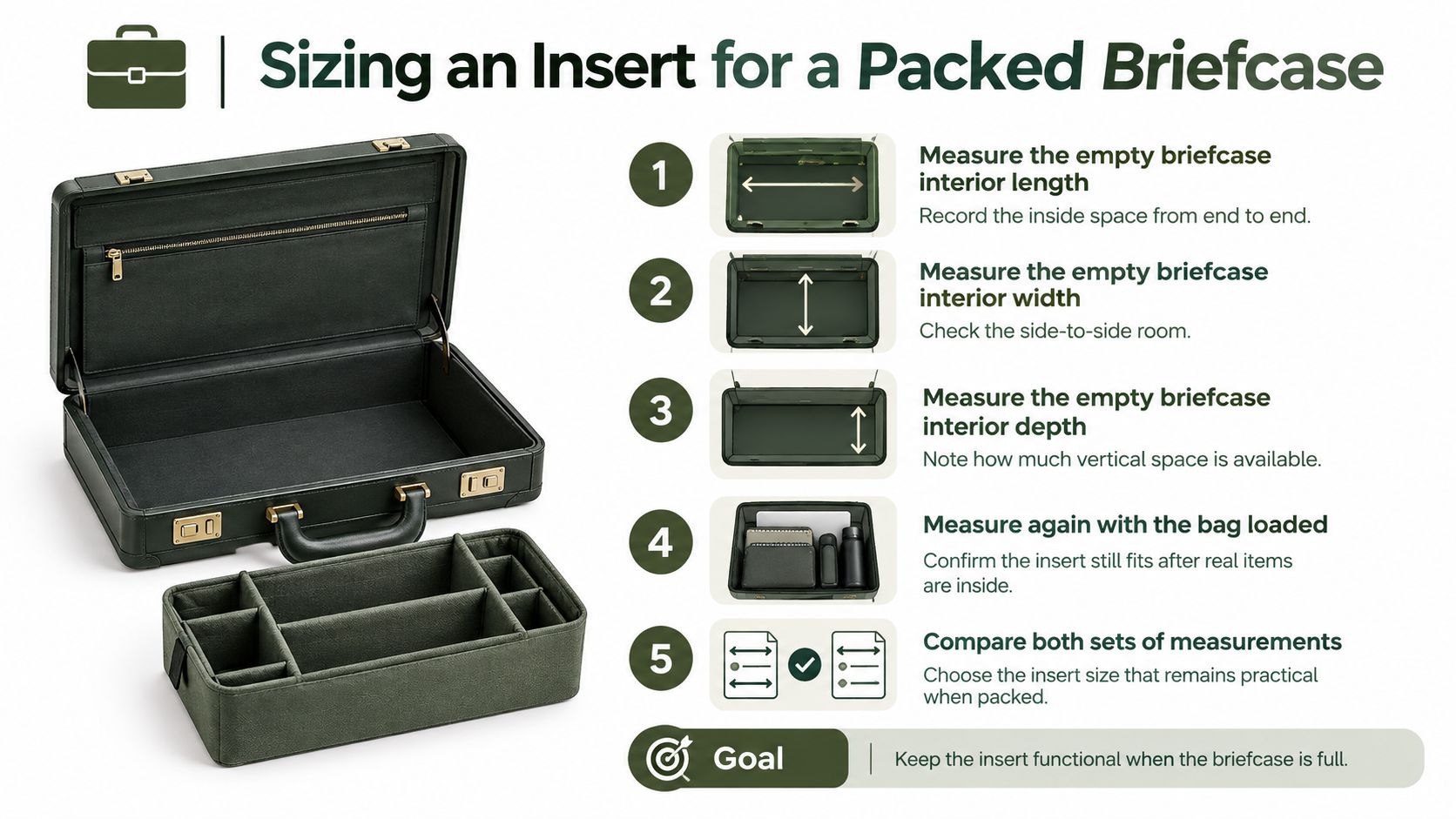
Measure Empty, Then Measure Loaded
- Measure the empty interior: Record length, width, and depth inside the briefcase, seam to seam, not the outside dimensions printed on a tag.
- Measure the closed laptop with its shell on: Note full width, depth, and thickness, including any corner bumpers.
- Add your documents: Place A4 or US Letter sheets in the case, because the two formats aren't the same size and your sleeve must suit the one you carry.
- Fill the front organizer: Loaded pockets intrude into the main space. Measure again with that intrusion in place.
- Compare both sets of numbers: Choose the insert that still fits in the loaded measurement, not the flattering empty one.
That second measurement is where universal sizing breaks down. A sleeve can fit an empty briefcase yet become too tight once documents and the front organizer are filled, while an oversized universal sleeve can let a smaller laptop move excessively during walking, a distinction set out in this sizing guidance for briefcases with laptop compartments. Devices with the same advertised screen size vary in shape, so the label can't settle the question for you.
The stakes are ordinary and common. A Japanese 2025 survey of 306 prospective work-bag buyers found insufficient capacity or inability to carry a PC was the leading stated dissatisfaction at 22%, ahead of weight and difficulty finding items.
Give the Paper Its Own Fit Test
Your document sleeve needs a slightly larger internal footprint than the paper, a firm perimeter, and an internal divider so edges don't overhang the enclosure. Overhanging edges are the ones that bend and tear in transit. If you're comparing structured options, these leather laptop briefcases show how a dedicated device space and a document space can coexist without competing for the same inches.
Finish with movement. Carry the packed case by hand, then on your shoulder. Walk stairs. Sit with it and open it on your lap. If the laptop shifts, the papers protrude, or you can't close the case without forcing it, the insert has failed the only test that matters.
Compartment Layouts That Stay Easy to Use
More pockets feel like more organization until you're carrying them. Every added compartment adds material, stitching, and a decision about what belongs there. Past a point, the insert gets heavier, the case pulls forward, and you search three small pockets instead of one open space.
Start with the weight you're already committing to. A 2025 work-bag comparison lists an example professional briefcase at approximately 1.1 kg before contents, as shown in the 2025 work-bag comparison. Your insert's empty weight comes on top of that, before a laptop or charger enters the discussion.
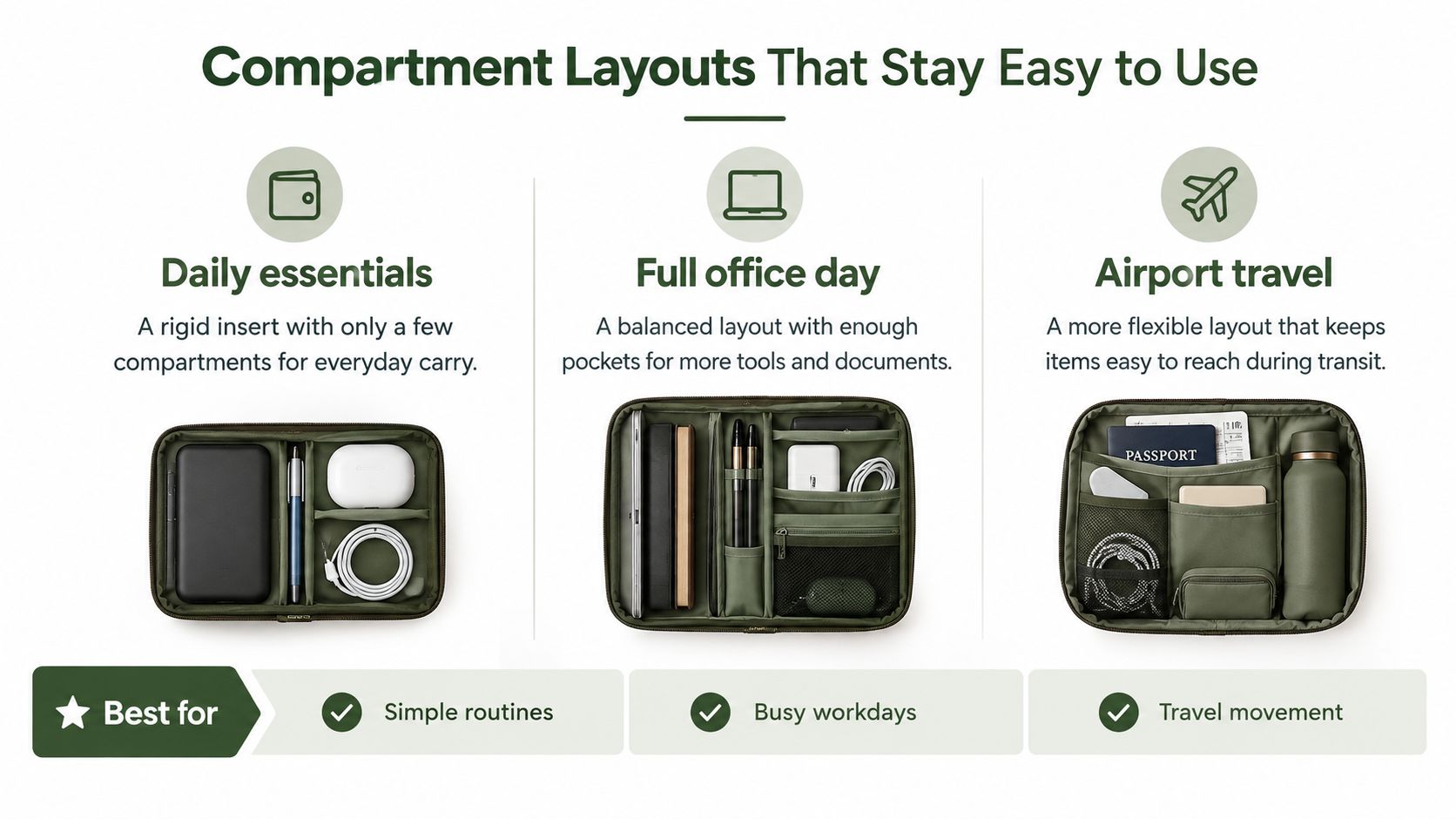
Three Layouts Across Three Loads
Test any layout against the cues that reveal problems. Watch loading time, access ease, strap comfort, deformation, laptop movement, and balance rather than judging appearance on a table. Commuter research flags heaviness and difficulty locating items alongside capacity complaints, which tells you retrieval speed is part of capacity, not separate from it.
| Layout | What it holds well | Access and balance | When to skip it |
|---|---|---|---|
| Rigid insert | Flat documents, notebook, pen slots, cards in fixed places | Fast one-handed retrieval, but added weight can pull the case forward | When your load is mostly irregular tech or travel gear |
| Lightly padded divider | Laptop or notebook separated from papers, one or two loose accessories | Light and flexible, slower to find small items | When you carry many small tools that need fixed homes |
| No insert | Bulky or changing loads that need open volume | No added weight, but items migrate and papers ride unsupported | When confidential documents or flat presentation papers travel daily |
Daily essentials usually suit a rigid insert with few compartments, because the set rarely changes. A full office day needs a balanced layout with enough pockets for tools and documents, but not so many that loading becomes a sorting exercise. Airport travel rewards flexibility, since a passport, glasses case, and cable kit don't match pen-slot dimensions.
Pocket Count Is Not Organization
The better briefcase organizer insert is often the smaller one. Leave open zones for chargers, a passport, or a glasses case instead of forcing irregular shapes into narrow pockets. You'll retrieve them faster, and the case will balance better. For small items that do need protection, proper fountain pen storage shows why a dedicated sleeve beats a shared pocket for delicate barrels and nibs.
For readers who prefer structure built into leather rather than added as a pouch, Grainmark Leather offers full-grain briefcases and portfolios alongside coordinated small cases for pens, eyewear, and tech. That's one route to the same goal. Whichever route you take, decide what you'll leave out. An insert you can't load quickly is a storage product, not a carry system.
Carry Setups for Papers Pens and Devices
A good layout becomes real when you pack it three different ways. The items change, but two principles hold across every setup. Keep papers fully supported in their own sleeve. Keep dense objects out of that sleeve and placed low, close to the carrying side.
Paper handling guidance explains the first principle plainly. The U.S. National Archives notes that overhanging document edges are vulnerable to bending, breaking, and tearing, while aligned sheets support one another inside a correctly sized folder, as detailed in National Archives guidance on paper records. Bulging storage creates pressure points, so controlled capacity protects better than maximum volume.
Three Packs You Can Copy
A courthouse or client day starts with the document sleeve. Slide Letter or A4 sheets in flat, aligned, and separated by the internal divider if you have two sets. Pens go in their slots, never loose against the paper. If the sleeve bulges, remove sheets rather than forcing the closure, because that pressure is what creases corners.
A hybrid office day adds bulk beside the papers, not inside their sleeve. Put the notebook against the firm back panel. Place the charger and power bank low and close to the carrying side, in bounded pockets or elastic loops. A combined laptop and document holder follows this same logic by keeping the flat items flat and giving the device its own boundary.
A short trip uses the open zones. Passport, glasses case, and cable kit sit where your hand reaches them without removing the laptop or disturbing documents. At security or on the train, you extract one zone at a time instead of unpacking the case in public.
A Caution About Ergonomic Claims
Compartmentalization helps you find things and stops load from migrating. Don't treat it as an automatic comfort upgrade. In a biomechanical study comparing a compartmentalized backpack with a conventional design, measured biomechanical parameters were not significantly different overall, even though elastic compartments were intended to keep books closer to the user's center of mass, as reported in the compartmentalized backpack biomechanics study.
Buy an insert for access and reduced shifting. Judge comfort by total packed weight and balance in your own hand.
That caution has a practical consequence. Several narrow pockets beat one deep cavity because they limit uncontrolled movement without piling dense mass at the bottom. Keep the briefcase organizer insert itself lightweight. Every gram it adds is a gram you can't spend on the things you're carrying.
Leather Care and Your Next Buying Step
Care for a leather insert means protecting the same full-grain surface you chose for its strength. The goal isn't to keep it looking new. It's to keep the hide, stitching, and back panel doing their structural work while the finish records normal use.
A waxed crazy horse finish will mark, lighten at bends, and darken where your hands handle it most. Let it. Scrubbing at every scuff to restore uniformity works against how the finish behaves. Most marks soften as the wax redistributes with handling and a dry cloth.
Habits That Protect the Structure
- Wipe dust off regularly: Grit left on the surface works into the grain as the insert flexes, so a quick dry wipe before it builds up does more than occasional deep cleaning.
- Keep it out of prolonged wet and heat: Let a damp insert dry at room temperature, away from radiators, and don't store it pressed against a heat source in a car or office.
- Don't overstuff the sleeves: Forcing capacity strains stitching and bends the back panel permanently, which undoes the paper support you bought it for.
When conditioning is appropriate, this guide to conditioning leather explains how to feed the hide without overdoing it. Condition sparingly. An insert handled daily picks up oils from your hands, and excess product can darken a waxed finish unevenly.
Check It After a Month of Carry
Look at the document sleeve edges first, since they open most often. Check whether zippers strain at the same point each time, whether the lining has started to rub paper corners, and whether dense pockets sag toward the bottom when loaded. Sagging pockets tell you the load distribution has drifted, and it's time to move heavy items back against the panel.
Then make your decision with the tests you've already run. If the packed-case measurement passed and the lighter layout still suits your daily load, compare structured full-grain briefcases and related organizers for pens, eyewear, and small tech. Where a piece is a gift or a long-term daily carry, personalization on eligible items adds a monogram without changing the construction. Buy for the packed weight and the retrieval speed you measured, not for a pocket count on a product page.
If your packed-case test points you toward structured leather, Grainmark Leather offers full-grain briefcases, portfolios, and coordinated organizers for pens, eyewear, and small tech that pair naturally with a briefcase organizer insert. Compare the layouts against your own laptop, paper format, and daily load, and choose the setup you can pack and unpack without thinking about it.